

LinkedScanner
AI-powered LinkedIn tool designed for personalized outreach and profile enhancement.
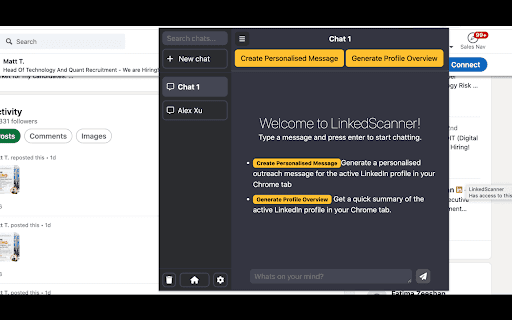
About LinkedScanner
LinkedScanner is an AI-driven platform that simplifies LinkedIn networking and outreach. It enables users to craft personalized messages, optimize profiles, and foster genuine connections with just one click. Leveraging ChatGPT technology, it generates tailored responses, improves profiles, and provides insights to maximize engagement on LinkedIn.
How to Use
To utilize LinkedScanner, select LinkedIn content, click the tool icon, and let AI generate customized messages, comments, or summaries. It seamlessly integrates with LinkedIn, offering ChatGPT capabilities directly within your browsing experience.
Features
- Seamless ChatGPT integration for smarter engagement
- AI-driven personalized message creation
- LinkedIn profile enhancement tools
- User-friendly interface with smooth LinkedIn integration
Use Cases
- Crafting impactful comments on LinkedIn posts
- Generating tailored outreach messages for prospects
- Enhancing LinkedIn profiles to attract more views
- Summarizing long LinkedIn posts efficiently
Best For
EntrepreneursRecruitersJob seekersSales professionalsMarketing expertsBusiness development teams
Pros
- AI features save time and streamline tasks
- Integrates effortlessly with LinkedIn
- Personalized messages boost engagement
- Intuitive design for easy use
Cons
- Privacy concerns related to data handling (though secure)
- AI output quality varies based on input
- Dependent on ChatGPT, with inherent limitations
FAQs
What is LinkedScanner?
LinkedScanner is an AI-powered tool that helps you create personalized outreach messages, optimize your LinkedIn profile, and build authentic professional connections.
How does LinkedScanner work with LinkedIn?
It integrates smoothly with LinkedIn, allowing you to select content and access AI features by clicking the LinkedScanner icon directly within your browser.
Is LinkedScanner officially affiliated with LinkedIn?
No, LinkedScanner is an independent platform and not officially connected to LinkedIn or its parent company.
How can I get support for LinkedScanner?
Support is available via email at hello@infitics.com for assistance and inquiries.