

MagicFridays Prompt List
Easily manage and insert AI prompts across multiple platforms using a convenient side panel interface.
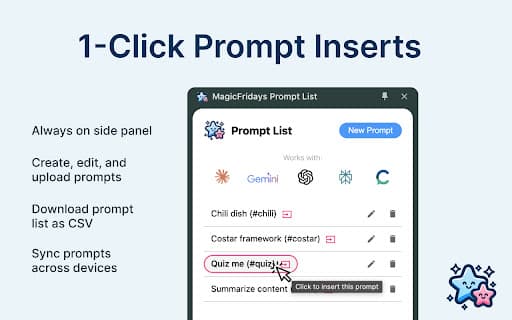
About MagicFridays Prompt List
This versatile tool enables users to organize and access AI prompts via a dedicated side panel. It allows quick insertion of prompts into platforms like ChatGPT, Claude, and Gemini through single-click or shortcode methods, streamlining prompt workflows.
How to Use
Access the side panel to store, organize, and quickly insert AI prompts. Use single-click or shortcode commands to seamlessly add prompts into ChatGPT, Claude, Gemini, and other supported platforms.
Features
- Instant prompt insertion with a single click
- Compatible with ChatGPT, Claude, Gemini, and more
- Organized prompt management via side panel
- Insert prompts using customizable shortcodes
Use Cases
- Build and manage a library of AI prompts for diverse tasks
- Rapidly insert common prompts during AI conversations
- Enhance productivity by quick prompt access
- Streamline prompt workflows across multiple AI platforms
Best For
Marketing professionalsAI prompt developersSoftware engineersResearch analystsContent creatorsAI enthusiasts
Pros
- Speeds up workflows with one-click prompt insertion
- Simplifies prompt organization and management
- Boosts efficiency in AI interactions
- Supports multiple AI platforms for versatility
Cons
- Requires installation or platform integration
- Functionality depends on platform compatibility
- May involve a learning curve for new users
FAQs
Which AI platforms are compatible?
This tool supports ChatGPT, Claude, Gemini, and other major AI platforms.
How can I insert prompts into AI platforms?
Use the side panel to insert prompts with a single click or via shortcodes within the AI interface.
Is the tool easy to set up?
Yes, it features a straightforward setup process compatible with supported platforms.
Can I organize my prompts effectively?
Absolutely. The side panel allows you to categorize and organize prompts for quick access.
Does this tool enhance productivity?
Yes, it streamlines prompt management and insertion, saving time during AI interactions.