

MailCompose Assist powered by GPT-3.5
Streamline your email writing in Gmail and Outlook with GPT-3.5-powered assistance, reducing composition time significantly.
About MailCompose Assist powered by GPT-3.5
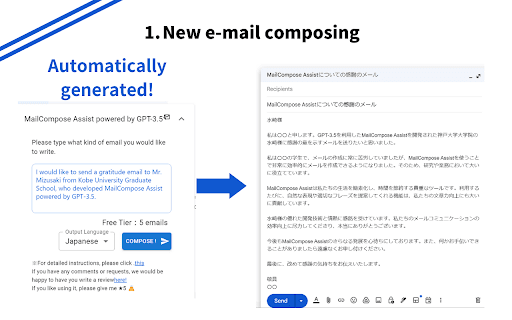
Mail Composition Assist leverages GPT-3.5 technology to help users craft emails more efficiently in Gmail and Outlook. It simplifies the process of composing new messages and replying to existing emails, eliminating concerns about cultural nuances and formal expressions. This tool saves time and enhances professional communication by automating email generation through intuitive features.
How to Use
To generate a new email, click 'Create New Email,' enter your message details in the bottom left, then click to send. For replies, select the email text, drag it into the reply area, and click 'Reply.' For detailed instructions, visit https://onl.sc/TSMG4M8.
Features
- Generate new emails automatically based on user input.
- Create reply emails quickly from selected text.
Use Cases
- Speed up replying to emails efficiently.
- Create professional emails instantly in Gmail and Outlook.
Best For
Pros
- Simple interface with one-click and drag-and-drop options.
- Reduces overall email composition time.
- Minimizes errors in cultural and formal expressions.
Cons
- Email generation typically takes around 10 seconds.
- Dependence on GPT-3.5 may require manual review for accuracy and tone.