

MailMentor | Sales Copilot
Sales Copilot for Tailored Outreach Campaigns
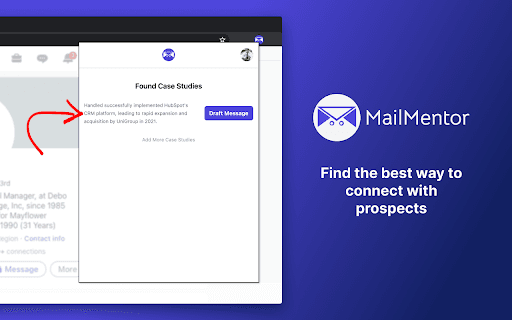
About MailMentor | Sales Copilot
MailMentor functions as a sales copilot that analyzes prospects' businesses and customer data while you browse. It creates personalized outreach messages that align with the prospect's interests and demonstrate how your offerings meet their needs. Using advanced algorithms, MailMentor scans over 20 websites per contact to gather context and automatically generate tailored emails.
How to Use
Install MailMentor, visit prospect websites, and the tool will analyze the information to generate personalized outreach messages. These messages are then sent directly to your Gmail account with the recipient's email address included.
Features
- Calendar integration for scheduling availability
- Automatic drafting of personalized outreach emails
- Prospect business and customer analysis
- Seamless integration with Gmail
Use Cases
- Creating customized sales emails for potential clients
Best For
Business development managersSales professionalsMarketing teamsOutbound sales teamsLead generation specialists
Pros
- Integrates with Gmail for streamlined outreach
- Automates prospect research and email creation
- Delivers highly personalized messages
- Boosts response rates with tailored content
- Includes calendar features for scheduling
Cons
- Accuracy depends on quality of prospect data
- Requires installation on your device
- Drafted messages may need manual review
FAQs
How does MailMentor personalize outreach messages?
MailMentor analyzes over 20 websites per contact to gather context, enabling it to craft messages that resonate with the prospect's interests and needs.
Where are the generated messages delivered?
All outreach drafts are sent directly to your Gmail inbox, complete with the recipient’s email address.
Can I customize the outreach messages?
Yes, you can edit the generated drafts to better match your personal style or specific campaign goals.
Does MailMentor integrate with my email platform?
It seamlessly integrates with Gmail, allowing you to send and manage messages directly from your email account.
Is installation complex?
Installation is straightforward, and detailed setup instructions are provided to ensure smooth integration.