

MaxQA
A Chrome and Edge browser extension that enables seamless chat interactions with Maximo using advanced AI powered by OpenAI.
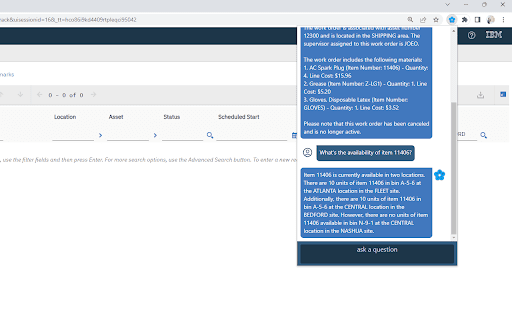
About MaxQA
This browser extension for Chrome and Edge empowers users to communicate with Maximo via conversational AI. It leverages OpenAI's language models to facilitate data access, task automation, and support within Maximo, enhancing productivity and ease of use.
How to Use
Install the extension on Chrome or Edge. Enter your Maximo and OpenAI API keys in the settings. Begin chatting with Maximo through the intuitive interface to access data and automate tasks.
Features
- Seamless integration with OpenAI language models
- Natural language data retrieval and management
- Customizable prompts for personalized interactions
- Intuitive chat interface for Maximo engagement
Use Cases
- Quickly access Maximo data with natural language queries
- Automate routine Maximo tasks through conversational commands
- Receive real-time assistance with Maximo workflows
- Troubleshoot issues efficiently using AI-powered chat
Best For
Maximo users seeking AI supportIT support professionalsMaintenance techniciansAsset management teamsMaximo system administrators
Pros
- Provides intelligent AI-driven support and guidance
- Streamlines workflows by automating tasks
- Improves user experience with conversational AI
- Simplifies Maximo interactions via natural language
Cons
- Requires setup with Maximo and OpenAI API credentials
- May need user training for optimal use
- Security considerations for API key management
- Response accuracy depends on OpenAI model quality
FAQs
How does this extension enhance Maximo usability?
It enables users to interact with Maximo through natural language, simplifying data access and task execution.
What are the essential requirements to use this extension?
You need access to Maximo and must have an OpenAI API key for AI-powered interactions.
How is the extension configured?
Enter your Maximo and OpenAI API keys in the extension settings to activate AI features.
Is this extension compatible with all Maximo versions?
It is compatible with most recent Maximo versions, but check specific requirements for your setup.
Can I customize the chatbot responses?
Yes, you can modify prompts and responses to tailor interactions to your organization's needs.