

Meeper - transcribe & summarize Meets
Open-source browser extension that leverages AI to provide accurate meeting transcriptions and concise summaries.
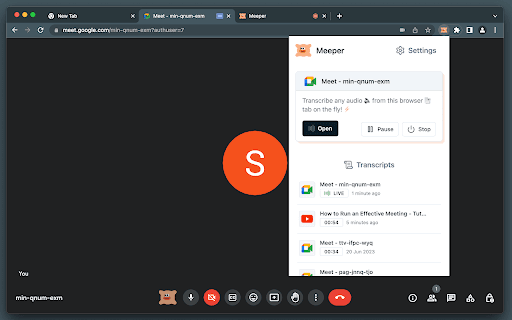
About Meeper - transcribe & summarize Meets
Meeper is an open-source browser extension designed to serve as a virtual secretary during online meetings. It utilizes ChatGPT and Whisper AI to deliver real-time transcriptions, generate summaries, and enhance meeting productivity across any browser tab.
How to Use
Install the Meeper extension from your browser's marketplace. Enter your OpenAI API key securely within the extension settings. During a meeting, activate Meeper via hotkeys, the extension icon, or right-click menu. The extension will automatically transcribe and summarize your meeting in real time.
Features
- Secure storage of your OpenAI API key locally
- Keeps a local history of transcriptions
- Transcribes simultaneously across multiple browser tabs
- Multiple activation methods including hotkeys and context menu
- Supports multiple languages for transcription
- Integrates seamlessly with ChatGPT and Whisper AI
- Detects speech to optimize API call efficiency
- Provides real-time control over transcription playback
- Automatically transcribes and summarizes online meetings
Use Cases
- Creating detailed meeting minutes
- Summarizing online lectures and webinars
- Analyzing meeting content for insights
- Enhancing accessibility for hearing-impaired users
- Transcribing and summarizing virtual meetings
Best For
StudentsJournalistsMeeting organizersProject managersResearchersFrequent online meeting attendeesIndividuals with hearing impairments
Pros
- Uses speech detection to optimize API calls
- Open-source and completely free
- Stores API keys securely on your device
- Supports multiple languages
- Offers various activation and control options
- Keeps transcription history locally for privacy
- Utilizes advanced AI models like ChatGPT and Whisper
Cons
- Requires an OpenAI account and API key setup
- Transcription accuracy varies with audio quality
- Can consume significant system resources during use
- Summary quality depends on ChatGPT performance
FAQs
How does Meeper keep my OpenAI API key secure?
Your API key is stored securely and encrypted locally within your browser, never transmitted externally.
How does Meeper reduce API usage?
Meeper detects speech to activate transcription only when necessary, reducing API calls and saving resources.
Can Meeper transcribe meetings in multiple languages?
Yes, Meeper supports transcription in various languages to accommodate diverse user needs.
Is Meeper free to use?
Yes, Meeper is an open-source extension available at no cost.
What are the system requirements for Meeper?
Meeper runs on most modern browsers supporting extensions and requires an active OpenAI API key.