

Meet Transcriber
Real-time transcription solution for Google Meet in unsupported languages, with human review and correction capabilities.
About Meet Transcriber
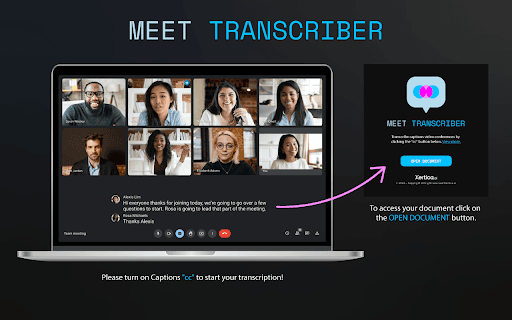
This platform enables real-time transcription in languages not natively supported by Google Meet, such as Portuguese and Spanish. Transcriptions are instantly sent to a Google Docs document, allowing a human reviewer to monitor and correct the text live. It seamlessly integrates with Google Meet using its built-in captioning feature for enhanced accessibility.
How to Use
Activate captions in Google Meet by clicking the “cc” button. Select the appropriate language for your audience. The transcription will automatically be sent to a Google Docs document for live review and editing.
Features
- Seamless integration with Google Meet's captioning system
- Supports multiple languages in real-time transcription
- Enables live editing and correction within Google Docs
Use Cases
- Providing accurate captions for diverse multilingual audiences
- Transcribing meetings in unsupported languages
- Creating a reliable written record of meetings with live human oversight
Best For
Organizations hosting multilingual meetingsAccessibility specialistsInternational teams in businessesEducational institutions with diverse students
Pros
- Enables real-time correction and editing of transcripts
- Supports languages not natively available in Google Meet
- Enhances accessibility for multilingual participants
- Simple integration with Google Meet and Google Docs
Cons
- Dependent on Google Meet's captioning being enabled
- Requires a human reviewer for live corrections
- Accuracy varies with audio quality and reviewer expertise
FAQs
How can I start the transcription in Google Meet?
Click the “cc” button to enable captions, and the transcription will begin automatically. Choose the appropriate language for your audience.
Where does the transcription appear during the meeting?
Transcriptions are instantly sent to a Google Docs document, where a human reviewer can monitor and edit the text in real time.
Can I transcribe meetings in languages not supported by Google Meet?
Yes, this solution supports multiple languages, including those not natively supported by Google Meet’s transcription feature.
Is human correction necessary during transcription?
Yes, a human reviewer can monitor and correct the transcription live for improved accuracy.
Does this require any additional software or setup?
It integrates directly with Google Meet and Google Docs, requiring no extra software beyond the setup of captions.