

Mergy by Betalgo
A browser extension that streamlines the integration of GitHub repositories with Claude AI for efficient code management and AI-assisted programming.
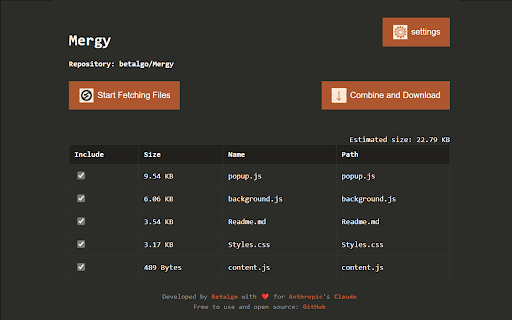
About Mergy by Betalgo
Mergy is a powerful browser extension that simplifies working with GitHub repositories within Anthropic's Claude AI platform. It allows users to easily fetch files from public repositories, select and combine multiple files into a single document, optimize content for AI processing, and download the final file for seamless upload to Claude Projects. Enhance your development workflow with this efficient tool.
How to Use
Navigate to a GitHub repository, click the Mergy icon, adjust settings, select files to include, generate the combined file, then upload it to your Claude Projects workspace.
Features
- Customizable rules for including or excluding files
- Intuitive interface with file size estimates
- Download consolidated files directly for Claude Projects
- Support for custom ignore patterns and .gitignore files
- Fetch files from public GitHub repositories easily
- Optimize file content for AI processing
- Combine multiple files into a single text document
Use Cases
- Managing small to medium-sized GitHub code libraries
- Providing comprehensive code context to Claude AI for smarter assistance
Best For
DevelopersAI EngineersSoftware EngineersData ScientistsTechnical Teams
Pros
- Flexible file selection and exclusion options
- Simplifies sharing codebases with Claude AI
- User-friendly and intuitive interface
- Adheres to .gitignore and custom ignore patterns
Cons
- Only supports public GitHub repositories
- Best suited for small to medium projects
- Requires a GitHub Personal Access Token for access
FAQs
What is Mergy?
Mergy is a browser extension that simplifies integrating GitHub repositories with Claude AI for efficient code management.
How does Mergy work?
It fetches files from public GitHub repositories, allows file selection and combination, optimizes content for AI, and enables downloading of the consolidated file.
Is a GitHub Personal Access Token needed?
Yes, a token is required for API access. It is stored locally and used solely for authentication purposes.
Can I exclude specific files from the fetch?
Yes, Mergy offers customizable rules and supports .gitignore files to exclude specific files or patterns.
Is Mergy compatible with private repositories?
No, Mergy currently supports only public GitHub repositories for file fetching.
How do I generate the combined file?
Select the desired files or folders, then click the merge button to create a single consolidated document for download.
Can Mergy optimize files for AI processing?
Yes, it includes features to optimize and prepare content specifically for AI model inputs.
Is Mergy free to use?
Yes, Mergy is available at no cost with basic features suitable for most developers.