

My ChatGPT Sidebar
A free Chrome extension that provides quick, convenient access to ChatGPT within a sidebar for enhanced browsing productivity.
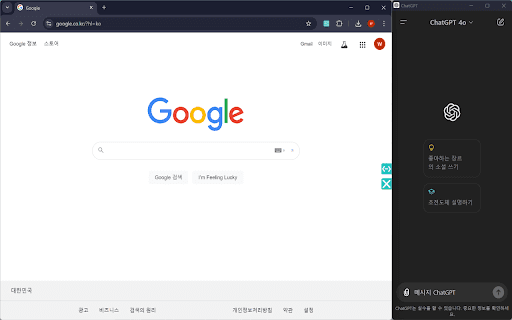
About My ChatGPT Sidebar
My ChatGPT Sidebar is a versatile Chrome extension that seamlessly integrates chatgpt.com into your browsing experience. It’s completely free to use, leveraging chatgpt.com instead of OpenAI’s API. Boost your efficiency by quickly obtaining answers, creating content, and brainstorming ideas without switching tabs. The extension automatically remembers your sidebar size for a consistent workflow. Ideal for writers, researchers, and professionals who rely on instant AI-powered support during web browsing.
How to Use
Install the Chrome extension and activate it. A sidebar appears on your screen, providing direct access to chatgpt.com. Use it to get instant answers, generate content, and brainstorm ideas while browsing the web.
Features
- Completely free to install and use
- Quick access to chatgpt.com via a sidebar
- Remembers and automatically saves your preferred sidebar size
Use Cases
- Access ChatGPT for quick assistance during web browsing
- Generate content efficiently while researching
- Brainstorm ideas without switching tabs
- Enhance productivity for writers and professionals
Best For
Pros
- Free to use with no hidden costs
- Provides convenient, quick access to ChatGPT
- Remembers sidebar size for a personalized experience
- Boosts productivity during browsing
Cons
- Dependent on chatgpt.com’s availability
- Requires the Chrome browser to function