

Naratta
Naratta enhances meeting productivity with real-time tips and comprehensive organization tools for pre- and post-meeting planning.
About Naratta
Naratta is a powerful tool designed to boost meeting efficiency and employee satisfaction by reducing unproductive meetings. It offers real-time tips within Google Meet to help keep discussions on track. Additionally, it includes features for organizing meetings before and after they occur, such as creating agendas, analyzing costs, and taking private notes.
How to Use
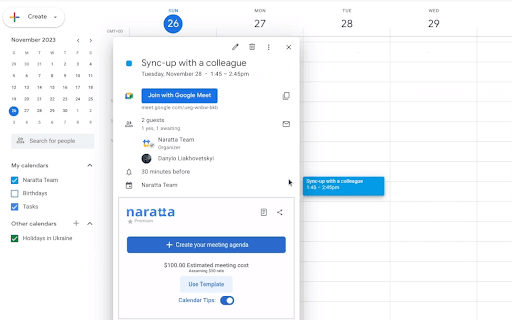
Integrate Naratta with Google Meet and Google Calendar. Install the extension to receive real-time prompts during meetings. Use Google Calendar to set agendas and take private notes directly within Google Meet for seamless meeting management.
Features
- AI-driven moderation (coming soon)
- Private note-taking during Google Meet sessions
- Real-time tips and prompts for meetings
- Agenda planning within Google Calendar
- Analysis of meeting costs
Use Cases
- Enhancing meeting efficiency and reducing wasted time
- Maintaining focus and staying on-topic during discussions
- Calculating the financial impact of meetings
- Supporting actionable follow-up with private notes
Best For
Scrum mastersExecutivesTeam leadersProject managersMeeting facilitators
Pros
- Boosts overall meeting efficiency
- Simplifies meeting organization
- Minimizes wasted time
- Provides real-time guidance and prompts
- Includes cost analysis features
Cons
- Depends on team adoption and compliance
- Requires Google Meet and Calendar integration
- Currently rule-based prompts; AI moderation is under development
FAQs
How does Naratta improve unproductive meetings?
Naratta offers real-time tips and prompts during Google Meet to keep discussions focused. It also provides tools for agenda setting and private note-taking before and after meetings.
What key features does Naratta provide?
Naratta includes real-time meeting tips, cost analysis, agenda management within Google Calendar, and private note-taking in Google Meet. AI moderation features are in development.
Is Naratta easy to install and use?
Yes, simply install the extension and connect it with Google Meet and Calendar. It seamlessly provides real-time prompts and organizational tools during meetings.
Can Naratta help reduce meeting costs?
Absolutely. Its meeting cost analysis feature helps teams understand and manage the financial impact of their meetings.
Does Naratta require special technical skills?
No, it is designed for easy setup and use, integrating smoothly with Google Workspace tools without requiring technical expertise.