

Natural Advanced Search for GitHub
An innovative tool that translates natural language commands into advanced GitHub search queries for more effective code exploration.
About Natural Advanced Search for GitHub
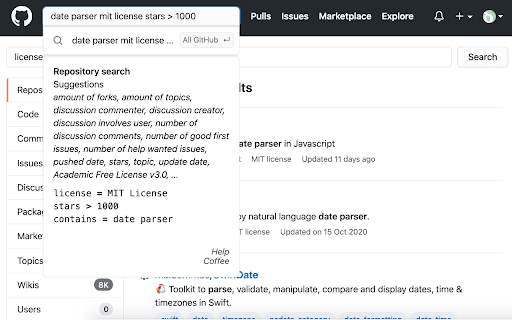
GitHub Natural Advanced Search enhances your code discovery process by converting everyday language into precise search commands. Powered by machine learning, it suggests search properties and refines queries, making it easier to locate issues, code snippets, and repositories efficiently.
How to Use
Simply enter your search phrase in natural language, and the tool will generate the corresponding advanced GitHub search syntax. It also offers property suggestions to narrow down results effectively.
Features
- Provides property suggestions for refined searches
- Converts natural language into complex GitHub search syntax
Use Cases
- Finding issues assigned to specific users
- Locating code snippets through natural language descriptions
- Filtering repositories by creation date and programming language
- Identifying projects with particular licenses and minimum stars
Best For
Open-source developersSoftware engineersTechnical recruitersResearch professionalsCode explorers
Pros
- Simplifies complex GitHub searches
- Offers intelligent property suggestions
- User-friendly natural language interface
- Enhances search accuracy and speed
Cons
- May not cover all search scenarios
- Requires installation of a browser extension
- Dependent on machine learning model accuracy
FAQs
What is GitHub Natural Advanced Search?
It is a tool that uses machine learning to convert natural language queries into complex GitHub search commands.
How does this tool work?
You input your search in natural language, and it generates an advanced search query while suggesting related properties.
Where can I access this search tool?
You can try it out at https://quantleaf.com.
Is this tool compatible with all browsers?
Yes, it works with most modern browsers once the extension is installed.
Can I use it without technical expertise?
Absolutely, its intuitive interface makes it easy for users of all skill levels.