

News Type Predictor
Easily predict news categories by selecting text and right-clicking to access the feature.
About News Type Predictor
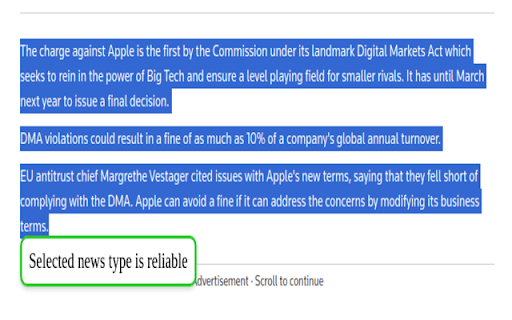
To predict the category of a news article, simply select the relevant text, right-click, and choose the 'Predict news type' option from the context menu. A small pop-up will display the predicted category near your selected text, providing quick and accurate results.
How to Use
Highlight the text you want to analyze, right-click, and select 'Predict news type' from the context menu. The prediction will appear in a pop-up for immediate review.
Features
- Accurate news type prediction
Use Cases
- Quickly classify news articles from text selections
- Assist journalists in categorizing news content
- Enhance research with instant news analysis
- Streamline content management workflows
Best For
News editorsJournalistsContent researchersMedia analystsMedia organizations
Pros
- Displays results conveniently in a pop-up window
- Enables rapid news classification without leaving the text
- Simple right-click interface for ease of use
Cons
- Requires integration with a context menu system
- Limited to news type prediction only
- Prediction accuracy depends on the underlying model
FAQs
How can I use the news prediction feature?
Select the text you wish to analyze, right-click, and select 'Predict news type' from the menu. The predicted category will appear in a pop-up.
Is this tool compatible with all browsers?
Compatibility depends on the integration with your browser's context menu system. Check specific browser support for seamless use.
Can I customize the prediction categories?
Currently, the tool uses preset categories for news classification and does not support customization.
Does the accuracy improve with more data?
Yes, the prediction model's accuracy increases with access to more training data and continual updates.
Is there a limit to how many texts I can analyze?
There are no specific limits; you can analyze as many text selections as needed during your session.