

Notes for ChatGPT
Enhance your ChatGPT experience with this Chrome extension that facilitates organized note-taking, boosting productivity and workflow efficiency.
About Notes for ChatGPT
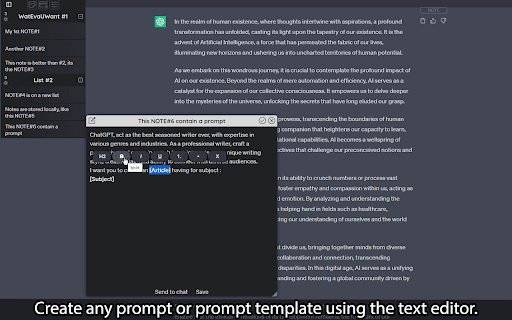
Notes for ChatGPT is a Chrome extension designed to improve your interaction with ChatGPT by providing an integrated, easy-to-use note-taking system. Quickly write, edit, and organize your prompts and responses within a sleek interface, making your workflow more efficient.
How to Use
Install the extension in Chrome. Use its user-friendly interface to create, edit, and organize notes. Group notes into folders, rearrange them via drag-and-drop, and convert chat messages into notes with the 'NOTE' button for quick saving.
Features
- Customizable visual themes for personalization
- Drag-and-drop interface for easy organization
- Unlimited local storage for notes and lists
- Create and manage notes and folders effortlessly
- Convert chat messages into notes with a single click
- Seamless integration directly within ChatGPT
Use Cases
- Organizing ChatGPT prompts and responses
- Saving key information from conversations
- Building a personal knowledge base within ChatGPT
- Managing research notes and brainstorming ideas
Best For
ChatGPT users seeking better organizationContent creators and writersStudents and researchersProfessionals integrating ChatGPT into workflowsKnowledge workers and digital note-takers
Pros
- Quickly save chat messages as notes
- Unlimited local storage capacity
- Smooth integration with ChatGPT platform
- User-friendly, intuitive interface
- Customizable appearance options
- Flexible organization with folders and drag-and-drop
Cons
- No cloud synchronization; limited to local storage
- Dependent on Chrome browser and ChatGPT platform
- Primarily designed for note management within ChatGPT
FAQs
What is Notes for ChatGPT?
It is a Chrome extension that adds a note-taking feature to ChatGPT, enabling users to save prompts and responses efficiently.
How can I organize my notes effectively?
Create folders to group related notes, and use drag-and-drop to reorder notes and folders easily.
Can I turn chat messages into notes?
Yes, simply click the 'NOTE' button to convert any chat message into a saved note.
Is there a storage limit for notes?
No, the extension provides unlimited local storage for your notes and organizational lists.
Does the extension support multiple themes?
Yes, you can customize visual themes to personalize your note-taking environment.
Can I use this extension across different devices?
Currently, storage is local to your device; there is no cloud sync feature.