

OpenAI API Usage Data Export
A Chrome extension that exports OpenAI API usage data into CSV format for detailed analysis and reporting.
About OpenAI API Usage Data Export
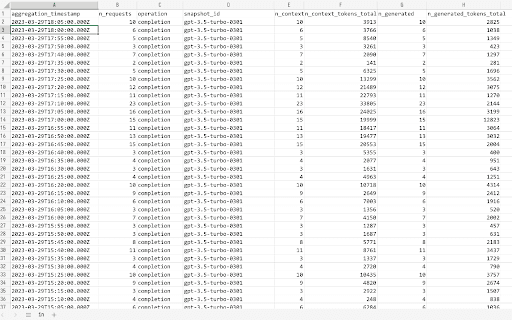
OpenAI API Usage Data Export is a powerful Chrome extension that allows users to export their API usage details into a CSV file. This simplifies data analysis, helping users monitor consumption patterns, manage costs, and generate comprehensive reports using spreadsheet tools like Excel or Google Sheets.
How to Use
Install the Chrome extension, log in to your OpenAI account, click the extension icon, select your desired time frame, and download the CSV report for detailed insights.
Features
- Exports OpenAI API usage data into CSV format for easy analysis
Use Cases
- Monitoring API expenses and usage trends
- Analyzing OpenAI API consumption in spreadsheets
- Generating reports for team review
- Tracking API performance over time
Best For
Developers managing API usageFinance teams tracking costsProject managers overseeing API projectsData analysts evaluating consumption patternsBusiness intelligence professionals
Pros
- Simple setup and intuitive operation
- Effortless export of API usage data
- Supports detailed analysis in Excel or similar tools
Cons
- Dependent on the structure of the OpenAI platform
- Requires Google Chrome browser
- Limited to exporting usage data only
FAQs
What information does this extension export?
It exports detailed OpenAI API usage data, including consumption metrics and timestamps for analysis.
How can I use this extension effectively?
Install the extension, log into your OpenAI account, click to generate a CSV report, and save it for review.
Is this extension compatible with all browsers?
No, it is specifically designed for Google Chrome browser.
Can I customize the data range for export?
Yes, you can select specific time frames to tailor the exported data to your needs.
Does this tool support real-time data monitoring?
No, it exports static usage data based on your selected time period.