

OpenAI Usage Insights (For Developers)
A Chrome extension designed to efficiently monitor and analyze your OpenAI usage data for better oversight and cost management.
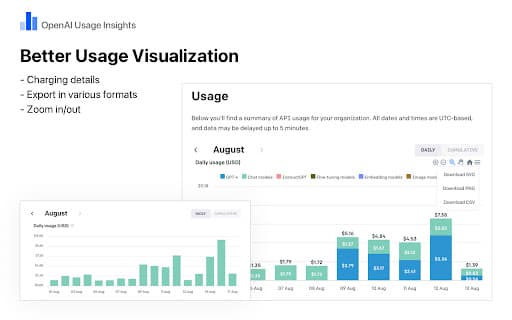
About OpenAI Usage Insights (For Developers)
OpenAI Usage Insights is a powerful Chrome extension that enhances your visibility into OpenAI usage. It enables detailed monitoring and analysis of your data, providing clear insights into monthly expenses for each model through user-friendly stacked charts. The extension supports easy export of usage data for in-depth analysis and record-keeping, all within a secure and reliable environment.
How to Use
1. Download and install OpenAI Usage Insights from the Chrome Web Store and ensure it is enabled. 2. Visit https://platform.openai.com/account/usage and log in to access your usage dashboard. 3. View the integrated charts for detailed insights or export data for further analysis.
Features
- Export and save monthly usage data effortlessly for detailed analysis.
- Visualize monthly costs for each OpenAI model with interactive stacked charts.
Use Cases
- Optimize OpenAI resource allocation by analyzing usage patterns.
- Control and reduce operational costs with detailed insights.
- Track and manage API usage for project budgeting.
- Identify high-usage periods to improve efficiency.
Best For
Pros
- Clear visualization of costs with stacked charts.
- Quick export of usage data for reports.
- Improves transparency of OpenAI consumption.
- Reliable, secure data handling.
Cons
- Requires Google Chrome browser.
- Depends on OpenAI's dashboard structure updates.
- Limited to monitoring OpenAI API usage only.