

Osito
Chrome extension that enables quick copying of webpage content for seamless use with ChatGPT.
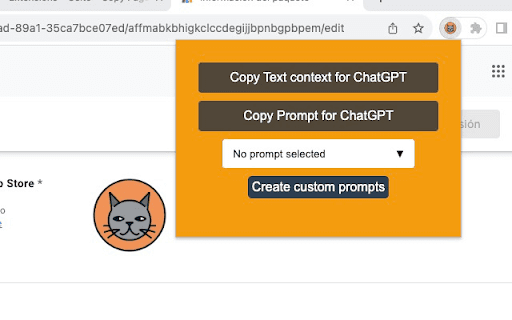
About Osito
Osito is a free Chrome extension designed to streamline copying webpage content directly into ChatGPT. With a single click, users can copy text from any webpage to facilitate insightful conversations and analysis within ChatGPT, leveraging context-aware features for enhanced understanding.
How to Use
Install the Osito Chrome extension. On any webpage, click the Osito icon to copy the content. Paste it into ChatGPT to ask questions or analyze the information effortlessly.
Features
- Single-click copying of webpage text
- Seamless integration with ChatGPT for context-aware queries
Use Cases
- Quickly extract webpage content for ChatGPT discussions
- Gather information efficiently from online sources
- Enhance research with easy content sharing
- Create summaries or ask questions about webpage material
Best For
StudentsResearchersContent creatorsChatGPT users seeking quick content transferDigital marketersEducators
Pros
- Free and easy to use
- Lightweight extension with minimal impact
- Simplifies asking context-rich questions in ChatGPT
- Fast, one-click content copying
Cons
- May capture unwanted elements like menus or ads
- Some users report copying issues with complex webpage layouts
FAQs
What is Osito used for?
Osito allows you to quickly copy webpage text for use in ChatGPT, enhancing your browsing and AI interaction experience.
Is Osito a free extension?
Yes, Osito is completely free to download and use on Chrome.
Does Osito collect my browsing data?
No, the developer has confirmed that Osito does not collect or share your data.
Can I copy entire webpages with Osito?
Osito enables copying selected content or entire pages, depending on your selection, for use with ChatGPT.
Is Osito compatible with all websites?
Osito works with most websites but may have limitations on pages with dynamic or complex layouts.