

Phlinx
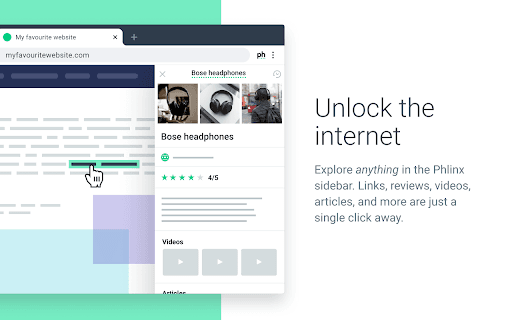
Phlinx instantly provides relevant information by long-clicking on text or links within your browser.
About Phlinx
Phlinx enhances your browsing experience by offering immediate access to related information through a simple long-click on any text or link. It automatically detects content such as people, places, movies, products, and more, providing contextually relevant details like trailers, social media profiles, and travel guides without leaving your current page.
How to Use
To utilize Phlinx, just long-press (click and hold) on any text or link on a webpage. A sidebar will appear, displaying relevant related information seamlessly.
Features
- Automatically detects various content types including people, locations, and media
- Displays related information in a sidebar without navigating away from the page
- Provides quick access to contextual details with a simple long-click
Use Cases
- Research products mentioned in online reviews quickly
- Find social media profiles for individuals referenced on websites
- Access movie details in articles without opening new tabs
- Retrieve travel guides for locations discussed in blogs
Best For
Web researchersStudents seeking quick infoJournalists gathering dataResearchers analyzing online contentContent creators
Pros
- Speeds up research by providing instant information access
- Keeps focus on the current page, maintaining context
- Simple to use with a long-press action
- Detects multiple content types automatically
Cons
- May occasionally show irrelevant information
- Sidebar can become distracting if overused
- Requires installation of the Phlinx extension
FAQs
How does Phlinx work?
Long-press on any text or link to see a sidebar with related information instantly.
What content types can Phlinx identify?
It detects people, locations, movies, games, products, and other content types automatically.
Do I need to leave my current webpage to use Phlinx?
No, all information appears in a sidebar without navigating away from your current page.
Is Phlinx compatible with all browsers?
Phlinx works with most modern web browsers that support extensions, such as Chrome and Firefox.
Is there a cost to use Phlinx?
Phlinx is available as a free extension, with optional premium features.