

Photo Stock Assistant
Chrome extension that automates the addition of image metadata on Adobe Stock for more efficient uploads.
About Photo Stock Assistant
Photo Stock Assistant is a powerful Chrome extension designed to streamline the process of adding titles, keywords, and categories to images on Adobe Stock. It accelerates content uploads, enhances SEO, and improves discoverability with AI-powered metadata generation, saving time and increasing productivity.
How to Use
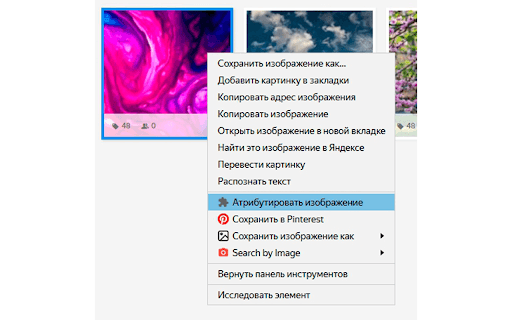
Install the Photo Stock Assistant Chrome extension. Once active, it automatically populates titles, keywords, and categories during image uploads on Adobe Stock. Use the right-click menu for quick attribution or apply metadata to multiple images simultaneously for efficiency.
Features
- Bulk metadata attribution for multiple images
- Quick image attribution via context menu
- AI-powered title and tag suggestions with OpenAI API
- Automated filling of titles, keywords, and categories
Use Cases
- Streamlining image metadata entry on Adobe Stock
- Enhancing SEO for stock images
- Saving time during large content uploads
- Automating repetitive metadata tasks for photographers and designers
Best For
PhotographersGraphic designersIllustratorsContent creatorsStock photo contributors
Pros
- Enhances SEO with optimized titles and tags
- Supports customizable settings and themes
- User-friendly with context menu options
- Reduces upload time by automating metadata
Cons
- Limited to Adobe Stock platform
- Quality depends on AI-generated content
- Requires OpenAI API key for full features
FAQs
What is Photo Stock Assistant used for?
It automates adding titles, keywords, and categories to images on Adobe Stock, saving time and improving search visibility.
Is AI technology involved in this extension?
Yes, it uses the OpenAI API to generate optimized titles and tags for your images.
Can I apply metadata to multiple images at once?
Yes, the extension supports bulk attribution for efficient management of multiple images.
Does this extension work with all browsers?
It is specifically designed as a Chrome extension and requires Google Chrome for optimal performance.
Is a subscription required to use the extension?
Basic features are free, but full functionality, especially AI-powered suggestions, requires an OpenAI API key, which may involve a subscription.