

PromptSaver
A browser extension that simplifies saving, organizing, and accessing text snippets for enhanced productivity.
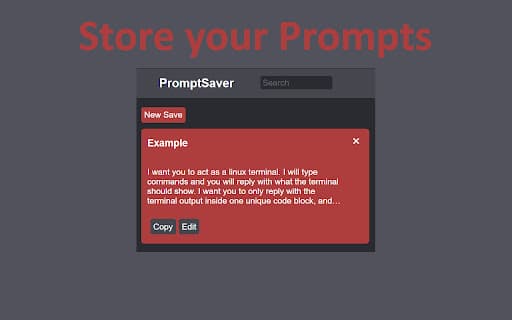
About PromptSaver
PromptSaver is a user-friendly browser extension that enables quick saving and organization of text snippets, including prompts for AI chatbots like ChatGPT. It features a compact, accessible window on any website, allowing seamless access, editing, and searching of your saved content without the need to log in. Your data is securely stored on your account for easy retrieval.
How to Use
Install the PromptSaver extension in your browser. A small control panel will appear, allowing you to save text snippets with a click. Access, search, and edit your saved snippets anytime, regardless of the website you're browsing.
Features
- Quickly save and organize text snippets
- Accessible from any website with a click
- No login required for immediate use
- Securely stores your data online
- Search and modify saved snippets easily
Use Cases
- Access important notes instantly
- Store and reuse frequently used code blocks
- Create templates for emails and documents
- Save and manage AI chatbot prompts
Best For
Content creatorsResearchersWritersStudentsAI prompt developersSoftware engineers
Pros
- User-friendly and accessible on any website
- Speeds up workflow with quick access to snippets
- No login needed for simple usage
- Data securely stored online
- Includes search and editing features
Cons
- Requires installation of the browser extension
- Security relies on extension's implementation
- Limited to managing text snippets only
FAQs
Is a user account required to use PromptSaver?
No, you can use PromptSaver without creating an account.
Where is my saved data stored?
Your data is securely stored in your online account.
Can I use PromptSaver on any website?
Yes, it works seamlessly on all websites.
Is PromptSaver free to use?
Yes, PromptSaver is free with optional premium features.
How secure is my saved data?
Your data is encrypted and stored securely on your account.