

QPEDIT
Chrome extension that enables AI-powered writing, editing, and prompt management seamlessly integrated with QPNOTES.
About QPEDIT
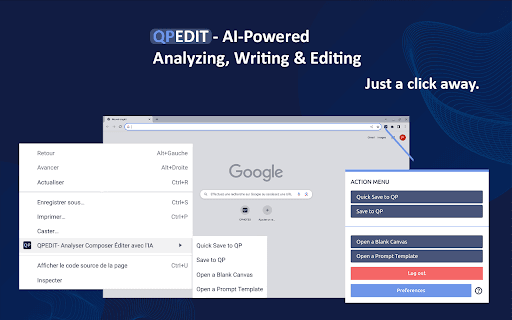
QPEDIT with AI is a powerful Chrome extension integrated with QPNOTES, a comprehensive prompt library for storing, refining, and sharing AI instructions. It enhances your workflow by enabling quick AI calls on selected content through a simple interface. Process text by selecting, pasting, typing, or dragging and dropping, and receive AI-driven analysis, editing, or content creation directly within Chrome.
How to Use
Right-click anywhere or select text and right-click to open QPEDIT. Enter custom prompts or choose from pre-made options. Drag content from QPNOTES into your prompts. Alternatively, access features via the Chrome Action menu for quick operation.
Features
- Customizable prompts and a library of pre-built templates
- Drag-and-drop support for easy content inclusion
- Seamless integration with QPNOTES for prompt management
- AI-powered writing, editing, and analysis within Chrome
- Access through contextual menu and Chrome Action menu
- Compatibility with multiple AI models including OpenAI and Anthropic
Use Cases
- Quick and accurate language translation
- Structuring and expanding content pieces
- Improving landing page copy
- Optimizing advertising copy and SEO tags
- Sentiment analysis and review categorization
- Refining lists such as names and addresses
- Generating new blog post ideas
- Personalizing email and article writing
- Engaging in meaningful online conversations
- Creating detailed guides or step-by-step instructions
- Testing different prompts in real-time
- Summarizing lengthy content effectively
Best For
Pros
- Supports using personal API keys or an all-in-one PRO+AI plan
- Compatible with multiple AI models
- Enhanced prompt management via QPNOTES
- One-click access to AI features
- Deep integration with Chrome browser
- Flexible options for custom prompts or ready-made templates
Cons
- Full functionality depends on QPNOTES
- AI features require PRO+AI subscription
- Additional charges may apply based on AI usage and subscription plan
Pricing Plans
Choose the perfect plan. All plans include 24/7 support.
QPNOTES PRO
Offers unlimited storage for AI instructions and prompt actions, plus access to private groups. AI chatbot usage and API keys incur separate costs paid directly to your AI provider.
Get StartedQPNOTES PRO + AI
Includes a monthly package of AI tokens sufficient for typical workloads. Your AI usage costs are covered in this plan.
Get Started