

Read Smart Scheduler: Calendar + Time Manager
Read Smart Scheduler leverages AI and analytics to optimize meeting schedules seamlessly within Google Calendar, enhancing productivity and efficiency.
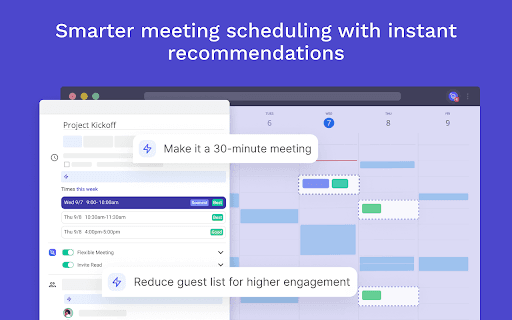
About Read Smart Scheduler: Calendar + Time Manager
Read Smart Scheduler is an advanced tool that enhances Google Calendar by automating optimal meeting times. It integrates with your calendar, analyzes participant metrics, and uses AI to suggest the best scheduling options. By joining video calls like Google Meet, Zoom, Teams, or Webex, it gathers data on engagement and talk time to improve future meeting planning and increase productivity.
How to Use
Download and install the Read Smart Scheduler Chrome extension. Connect it to your Google Calendar, and the tool will automatically analyze meeting data and recommend optimal times for your meetings.
Features
- Seamless integration with Google Calendar
- Real-time meeting metrics including talk time, engagement, and sentiment analysis
- Data-driven analysis to improve scheduling efficiency
- Detailed post-meeting reports with highlights, topics, notes, and transcripts
- Automated scheduling suggestions based on participant engagement metrics
Use Cases
- Scheduling meetings at times that suit all participants
- Rescheduling when double bookings occur
- Boosting participant engagement and punctuality
- Allocating focused work periods within your day
- Accessing comprehensive post-meeting analytics and insights
Best For
Team leadersExecutivesHR professionalsProject managersFrequent meeting schedulersSales teams
Pros
- Provides comprehensive post-meeting analytics
- Enhances engagement and punctuality among participants
- Optimizes meeting efficiency with AI insights
- Integrates smoothly with Google Calendar
- Automates scheduling to save time
Cons
- Dependent on accurate meeting data for best results
- Requires access to video calls as a participant
- Potential privacy concerns due to data collection, with raw audio and video deleted after calls
FAQs
How does Read Smart Scheduler determine my best meeting times?
It learns your optimal times by analyzing data from your video calls across platforms like Google Meet, Zoom, Teams, and Webex using AI and analytics.
What types of data does Read Smart Scheduler collect during meetings?
It collects metrics such as talk time, engagement levels, and sentiment scores, with raw audio and video deleted after the call.
Where can I view my post-meeting reports and insights?
Post-meeting reports are accessible directly within Google Calendar, providing detailed analytics and scheduling recommendations.
Is Read Smart Scheduler compatible with all video conferencing platforms?
Yes, it works with major platforms like Google Meet, Zoom, Microsoft Teams, and Webex by joining calls as a participant.
Does using Read Smart Scheduler impact my privacy?
The tool collects meeting metrics but deletes raw audio and video data after each call to ensure privacy and data security.