

ReadImage
Effortlessly extract, edit, and copy text directly from images on web pages with this powerful extension.
About ReadImage
This browser extension enables users to extract text from images displayed on web pages. It supports common image formats such as JPG, JPEG, PNG, and BMP. Once extracted, the text can be easily edited and copied for use in your projects or research.
How to Use
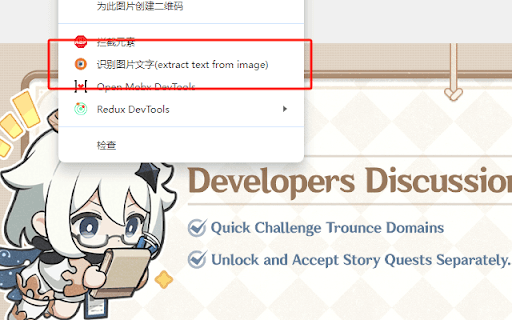
Hover your cursor over the image, right-click, and choose 'Extract text from image'. Press 'Ctrl + Q' to view and edit the extracted text within the extension interface.
Features
- Edit and customize extracted text
- Extract text from images on web pages
- Copy text for use in other applications
Use Cases
- Extracting text while coding or browsing online
- Copying product information from e-commerce images
- Digitizing text from visual content for research
- Reading text from images during online shopping
Best For
StudentsContent creatorsWeb developersE-commerce shoppersResearchers
Pros
- Allows editing and copying of extracted text
- Seamless right-click menu integration
- Effortless text extraction from images
Cons
- Potential timeout or URL format errors in restricted networks
- Limited to JPG, JPEG, PNG, and BMP image formats
FAQs
Which image formats are compatible?
The extension supports JPG, JPEG, PNG, and BMP formats.
What causes 'timeout' or 'URL format illegal' errors?
These issues often result from network restrictions in certain regions.
How can I view the extracted text?
Right-click the image, select 'Extract text from image', then press 'Ctrl + Q' to see the text in the extension window.
Can I edit the extracted text?
Yes, once extracted, the text can be edited directly within the extension.
Is this extension free to use?
Yes, it is available at no cost for extracting and editing text from images.