

Remove Background from Image
Effortlessly remove backgrounds from images with a single click for professional-quality results.
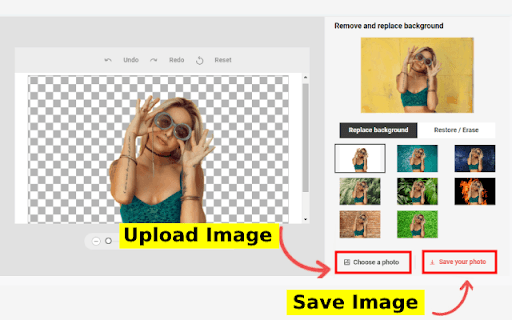
About Remove Background from Image
Our platform offers a simple, one-click solution to eliminate backgrounds from your images. Upload your photo, and the system automatically isolates the subject, providing a clean, transparent background ready for your design or editing needs.
How to Use
Upload your image to the platform. The software will automatically remove the background for a seamless result.
Features
- Instant automatic background removal
Use Cases
- Designing product images with transparent backgrounds for online stores
- Isolating subjects for graphic design and marketing materials
- Preparing images for presentations and reports
Best For
Individuals seeking fast background removalE-commerce entrepreneursProfessional photographersGraphic designersSocial media content creators
Pros
- No technical expertise required
- Speeds up the background removal process
- Simple, one-click interface
Cons
- Results may vary based on image complexity
- Less effective with highly detailed or complex backgrounds
FAQs
How does the background removal process work?
The tool uses advanced algorithms to automatically detect and erase the background from your uploaded image.
Can the background removal be perfect every time?
While designed for accuracy, the quality may vary depending on the complexity of the image.
Is there a limit on image size or resolution?
The platform supports high-resolution images, but size limits may apply based on your subscription plan.
Do I need any technical skills to use this tool?
No, the process is simple and user-friendly, requiring no prior editing experience.
Can I download my edited images in different formats?
Yes, you can export your images in various formats, including PNG and JPEG.