

Reply2Tweets
Create engaging tweet replies effortlessly with GPT Plus. Enter a tweet, and receive a relevant response instantly.
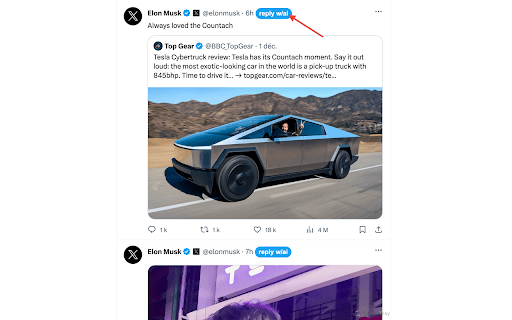
About Reply2Tweets
This tool simplifies crafting tweet responses by leveraging GPT Plus. Just input a tweet, and it generates a tailored reply automatically. Note: A GPT Plus subscription is required for use.
How to Use
Paste a tweet into the tool, and it will produce a reply for you. A GPT Plus subscription is necessary for access.
Features
- Automated generation of tweet responses
Use Cases
- Respond quickly to tweets without drafting replies manually
- Manage high-volume social media interactions efficiently
- Support customer service on Twitter
- Enhance engagement with followers effortlessly
Best For
Social media managersInfluencers and content creatorsBusinesses handling customer inquiriesIndividuals managing large Twitter accounts
Pros
- Saves time by automating reply creation
- Helps overcome writer's block in social engagement
- Provides a solid starting point for conversations
Cons
- Generated replies may require editing for perfection
- Requires a GPT Plus subscription for access
- AI responses might lack full authenticity
FAQs
Is a GPT Plus subscription necessary to use this tool?
Yes, a GPT Plus subscription is required to access this service.
How does the tool generate tweet replies?
You input a tweet, and the AI produces a relevant response automatically.
Can I customize the responses generated by the tool?
You can edit the AI-generated replies to better suit your style before posting.
Is this tool suitable for professional social media management?
Yes, it helps streamline responses and improve engagement for businesses and influencers.
Are there any limitations on usage?
Usage depends on your GPT Plus plan, which may have daily or monthly limits.