

rKnown2Notion
Seamless Notion integration for automatic synchronization of knowledge bases and content from Zhiliao Reading.
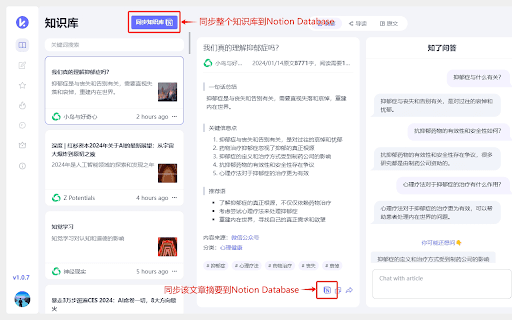
About rKnown2Notion
The Zhiliao Reading Notion sync plugin enables automatic transfer of knowledge repositories and content from https://readknown.cn, an AI-powered article summarization platform, directly into your chosen Notion database. This streamlines content organization and allows seamless integration of AI-generated summaries into your workflow.
How to Use
Install the Zhiliao Reading Notion sync plugin, connect it to your Notion account, and select a database. Content from Zhiliao Reading will then automatically update within your designated Notion workspace.
Features
- Automates synchronization of knowledge bases and content from Zhiliao Reading to Notion
- Enables effortless content management and organization
- Integrates AI-generated summaries directly into Notion databases
Use Cases
- Streamline knowledge management workflows
- Archive and organize AI-summarized articles
- Enhance research and content curation
- Improve team collaboration with centralized information
- Support educational and research activities
Best For
StudentsContent CreatorsResearchersKnowledge WorkersEducatorsContent Managers
Pros
- Enables automatic content synchronization, saving time
- Simplifies content organization and management
- Integrates AI summaries into your Notion workflow
- Reduces manual data entry and duplication
Cons
- Relies on the stability of Zhiliao Reading and Notion platforms
- May require configuration and authorization for optimal use
- Dependent on internet connectivity for synchronization
FAQs
What is the purpose of the Zhiliao Reading Notion sync plugin?
It automatically transfers knowledge and content from Zhiliao Reading into your Notion databases, facilitating easy content management.
How do I set up the Zhiliao Reading Notion integration?
Install the plugin, connect it to your Notion account, and select a database. Content from Zhiliao Reading will then sync automatically.
Can I customize which content gets synchronized?
Yes, you can specify preferred content sources and set synchronization preferences within the plugin settings.
Is the plugin compatible with all Notion plans?
The plugin works with all Notion plans that support API access, including personal and team workspaces.
What are the benefits of using this integration?
It streamlines content management, saves time, and consolidates AI-generated summaries directly into your workflow.