

Rocky AI
AI-powered browser extension for seamless webpage content interaction and information retrieval.
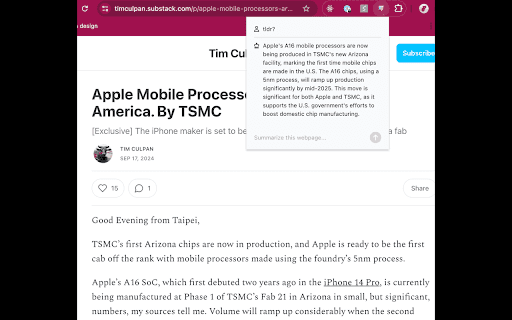
About Rocky AI
This advanced AI browser extension enables effortless interaction with webpage content. By pressing Cmd + K (on Mac), users can quickly open the extension in their current tab to ask questions and get instant insights.
How to Use
Press Cmd + K (on Mac) to activate the extension in your current browser tab and begin asking questions immediately.
Features
- Instant AI-powered content interaction on any webpage
Use Cases
- Personalized LinkedIn outreach
- Analyzing reviews
- Summarizing articles
- Rapid information retrieval
Best For
MarketersDevelopersSales professionalsStudentsContent creatorsResearchers
Pros
- Supports diverse content types for versatile use
- Provides quick summaries and extracts key information
- Accessible with a simple keyboard shortcut
- Boosts productivity through instant AI assistance
Cons
- Performance depends on AI model quality
- Requires internet connection for optimal use
- Currently available only on Mac (Cmd + K)
FAQs
How do I activate the AI extension?
Press Cmd + K (on Mac) to open the extension in your current browser tab.
What are common use cases for this extension?
It is ideal for summarizing articles, quick information searches, personalized outreach on LinkedIn, and review analysis.
How can I provide feedback or ask questions?
Join our community at https://discord.gg/3T37mU9v to share your feedback and ideas.
Is this extension compatible with all browsers?
Currently, the extension is optimized for Mac users and may have limited compatibility with other browsers.
Does the extension require an internet connection?
Yes, an active internet connection is necessary for the AI to function properly.