

Sagai - Writing Assistant
Sagai is a Chrome extension that enhances your writing by analyzing and refining your text for clarity and correctness.
About Sagai - Writing Assistant
Sagai is a powerful Chrome extension designed to improve your writing across various online platforms. It analyzes your text, offers suggestions for clarity, and helps eliminate errors for more professional communication.
How to Use
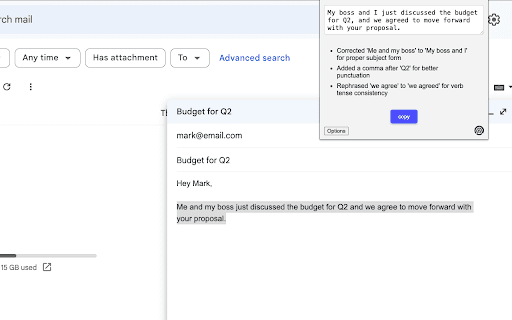
Write as usual on any website. Highlight the text you want to improve, click the extension icon, review the suggested edits, and replace your original text with the improved version.
Features
- Enhances text clarity and readability
- Provides real-time writing suggestions
- Automatically detects and corrects errors
Use Cases
- Refining emails, reports, and social media posts
Best For
ProfessionalsWritersOnline content creatorsBloggersStudents
Pros
- Offers effective wording suggestions
- Boosts writing clarity and precision
- Seamlessly integrates with any website
- Keeps API key stored locally for user privacy
Cons
- May not suit all writing styles
- Requires an OpenAI API key
- Dependent on OpenAI API availability
FAQs
How does Sagai improve my writing?
Sagai analyzes your text, then provides suggestions to make it clearer and error-free. Highlight your text, click the icon, and review the improved version.
Is my data secure with Sagai?
Yes, your OpenAI API key remains stored locally in your browser, ensuring your data stays private.
Do I need an OpenAI API key to use Sagai?
Yes, an OpenAI API key is required to enable the extension's features.
Can Sagai be used on any website?
Absolutely. Sagai works seamlessly across all websites where you write or edit text.
Is Sagai suitable for professional writing?
Yes, it helps improve the clarity and correctness of professional documents, emails, and social media posts.