

Save ChatGPT to Notion Database
A Chrome extension that enables you to effortlessly save ChatGPT conversations directly into Notion with just one click, enhancing your organization and productivity.
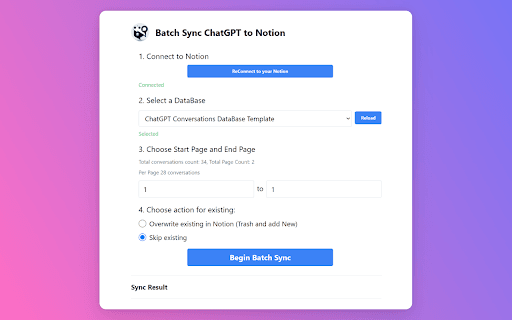
About Save ChatGPT to Notion Database
Save your ChatGPT conversations directly into a Notion database with this intuitive Chrome extension. Designed for seamless integration, it allows you to archive chats instantly, supporting efficient organization for learning, work, and personal projects. Its simple, fast, and precise functionality enhances user experience, making it ideal for students, professionals, and everyday users. The extension also includes a comprehensive FAQ to assist users in setup and usage.
How to Use
Install the Chrome extension, connect your Notion account by granting necessary permissions, and click the save button during your chat sessions to automatically store conversations in your selected Notion page.
Features
- Export ChatGPT chat history in Markdown format
- One-click saving of conversations to Notion
- Supports direct integration with Notion databases
- Easy setup and user-friendly interface
Use Cases
- Archiving ChatGPT sessions for future review
- Organizing chats for better learning and productivity
- Saving educational, professional, and personal conversations
- Creating a centralized knowledge base
Best For
Pros
- Seamless integration with ChatGPT and Notion
- Enhances organization and workflow efficiency
- Supports exporting chats as Markdown files
- Simple, single-click operation
Cons
- Relies on the stability of ChatGPT and Notion APIs
- Requires Notion account setup and authorization