

SayAI
Enhance your ChatGPT experience with the SayAI extension, offering seamless voice input and audio output features.
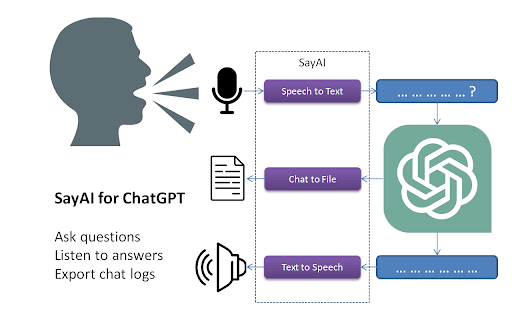
About SayAI
SayAI is a powerful browser extension that integrates speech-to-text and text-to-speech functionalities with ChatGPT. It enables users to ask questions using voice commands and listen to responses, making interactions more natural and accessible. This tool reduces the need for typing and screen viewing, enhancing multitasking and accessibility.
How to Use
Install the SayAI browser extension and enable voice recording. Use the interface to ask questions verbally and listen to ChatGPT's spoken answers. Toggle voice input and audio output features easily within the extension controls.
Features
- Converts text responses to speech for easy listening
- User-friendly toggles for activating voice input and audio output
- Supports multiple languages through OpenAI Whisper API
- Enables voice-based question asking for hands-free interaction
Use Cases
- Speeding up question input with voice commands
- Engaging with ChatGPT hands-free during multitasking
- Listening to ChatGPT responses while on the go
Best For
Students seeking efficient study toolsFrequent ChatGPT usersProfessionals requiring hands-free assistanceAccessibility-focused usersMultilingual speakers
Pros
- Enables voice-based question input for convenience
- Supports multiple languages for diverse users
- Free to download and use
- Minimizes screen time by providing audio responses
Cons
- Performance depends on internet stability and device capabilities
- Accuracy relies on speech recognition and synthesis APIs
FAQs
Is SayAI free to use?
Yes, SayAI is completely free.
Which languages are supported for voice recording?
Voice recording supports several languages via the OpenAI Whisper API.
Can I ask questions by voice and have ChatGPT only display the text answer?
Absolutely, you can use voice input while receiving text responses from ChatGPT.
Is SayAI compatible with all browsers?
It works best on modern browsers like Chrome and Firefox. Compatibility may vary.
How do I enable or disable voice features?
Use the extension's toggle controls within the user interface to activate or deactivate voice input and audio output.