

ScrollLess
A browser extension that simplifies navigation by allowing users to easily hide or reveal ChatGPT responses during lengthy conversations.
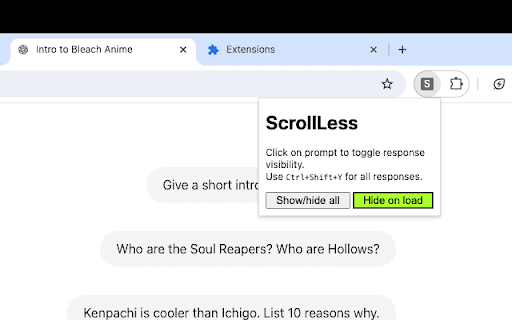
About ScrollLess
This browser extension enhances your ChatGPT experience by enabling quick hiding or revealing of responses in long conversations. With a simple shortcut, users can toggle all responses, making it easier to locate specific questions. It also allows toggling individual responses by clicking on prompts, streamlining conversation review.
How to Use
Press `Ctrl+Shift+Y` or `Cmd+Shift+Y` to hide or show all ChatGPT responses. Click on a prompt to toggle its associated response. Configure the extension to auto-hide responses on startup via the settings menu.
Features
- Automatically hide responses when loading chat (configurable)
- Click on prompts to toggle individual responses
- Use shortcuts to quickly hide or show all responses
Use Cases
- Efficiently review chat history
- Locate specific questions in lengthy conversations
- Focus on prompts without distraction from responses
Best For
Users engaging in extended ChatGPT conversationsResearchersDevelopersStudentsWriters
Pros
- Speeds up navigation by quickly hiding or revealing responses
- Enhances browsing experience in long chats
- Simple to operate with keyboard shortcuts and clicks
- Offers customizable auto-hide settings
Cons
- May be unnecessary for brief conversations
- Requires installing a browser extension
- Limited to managing ChatGPT chat responses
FAQs
How can I hide all ChatGPT responses?
Press `Ctrl+Shift+Y` or `Cmd+Shift+Y` to toggle visibility.
How do I reveal all responses in ChatGPT?
Use the same shortcut, `Ctrl+Shift+Y` or `Cmd+Shift+Y`, to show responses.
How can I hide or show a specific response?
Click directly on the prompt associated with that response.
Is it possible to auto-hide responses when ChatGPT loads?
Yes, enable the auto-hide feature in the extension's settings menu.