

Search support
A Chrome extension that simplifies research by providing related information for selected text, enhancing productivity and information gathering.
About Search support
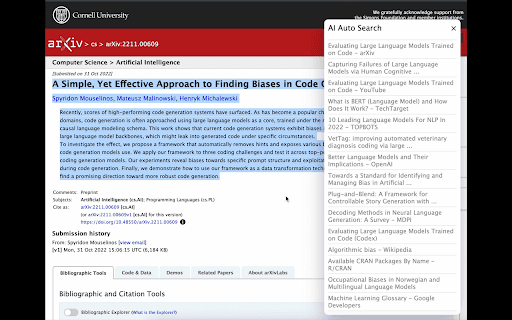
Search Support is a powerful Chrome extension designed to streamline online research. By providing relevant information for highlighted text on websites or ChatGPT, it helps users gather insights quickly. When you select text, a search button appears, opening a pop-up with related results, saving time and improving research efficiency.
How to Use
Install the Search Support Chrome extension. Highlight any text on a webpage or in ChatGPT. Click the appearing "search" button to view related information in a convenient pop-up window.
Features
- Multiple search modes with refresh option
- Supports multiple languages
- Adjust search sensitivity with high, medium, and low settings
- Provides contextual search based on selected text
- Displays search results in a pop-up window
- Shows domain name beneath the search title
Use Cases
- Quickly understand unfamiliar terms during browsing.
- Gather context efficiently for research papers and articles.
- Find related information within ChatGPT conversations.
Best For
Frequent online researchersWriters and content creatorsAcademic researchersStudents and learnersDigital content developers
Pros
- Flexible search modes with customization
- Speeds up research with instant results
- Simple to use with text selection and button click
- Supports multiple languages for global users
- Enhances research workflow
Cons
- Dependent on search engine accuracy
- May require tweaking settings for optimal results
- Pop-up windows could be intrusive if overused
FAQs
What is Search Support?
Search Support is a Chrome extension that makes online research easier by providing related information for selected text.
How do I use Search Support?
Highlight the desired text, click the "search" button, and view related information in a pop-up window.
Does Search Support work in multiple languages?
Yes, it offers multilingual support to accommodate users worldwide.
Can I customize the search sensitivity?
Yes, you can choose between high, medium, and low search modes for better relevance.
Is the extension easy to install and use?
Absolutely. After installation, simply highlight text and click the search button for quick results.