

Sense App
An AI-powered platform that organizes and connects your work assets, discussions, and related information seamlessly.
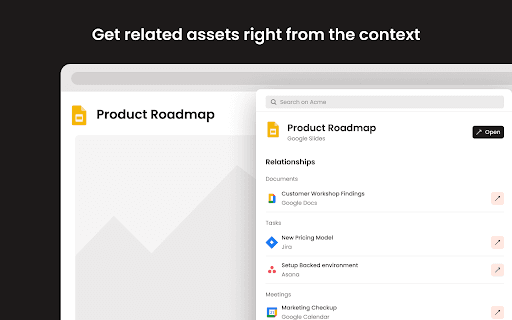
About Sense App
Sense is an AI-powered hub that automatically organizes and interconnects files, documents, tasks, links, meetings, conversations, and contacts. It highlights what matters most at any given moment. The Sense Chrome Extension enables users to access relevant work assets and discussions directly from any browser tab. The current version is available for testing and feedback.
How to Use
Request access by emailing request@senseapp.ai. After approval, install the Sense Chrome Extension to view related files and discussions for any active tab.
Features
- Chrome Extension for instant access to related content
- Smart prioritization of key information
- Automatic linking and organization of work assets
Use Cases
- Access relevant files and conversations instantly while browsing
- Streamline project workflows with organized assets
- Enhance team collaboration with connected discussions
Best For
Project managersKnowledge workersTeam leadersResearch professionalsProduct teams
Pros
- AI-powered organization and prioritization
- Centralized hub for all work-related data
- Quick access through Chrome Extension
Cons
- Requires an invitation for access
- Early version may have limited features or bugs
FAQs
How do I get access to Sense?
Send an email to request@senseapp.ai to receive an invitation.
What functions does the Sense Chrome Extension provide?
It allows you to access related work assets and discussions for any active browser tab.
Is Sense suitable for team collaboration?
Yes, it enhances teamwork by connecting files, conversations, and tasks in one organized platform.
Can I try Sense before purchasing?
Yes, a test version is available for evaluation and feedback.
What types of work assets does Sense organize?
It organizes files, links, documents, meetings, conversations, and contacts automatically.