

Shakespeare AI Toolbar: AI Writing Anywhere
AI toolbar designed for seamless writing, summarizing, and rephrasing across any website.
About Shakespeare AI Toolbar: AI Writing Anywhere
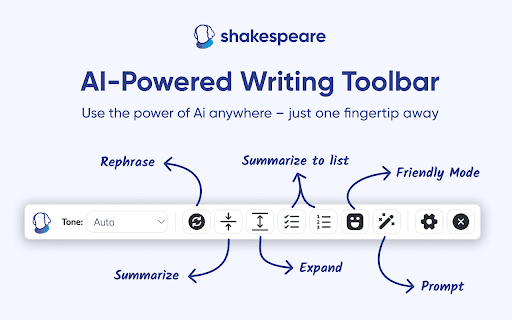
Shakespeare is an advanced AI-powered toolbar that integrates directly into your browser, serving as your AI Assistant and Writer. It enables quick summarization, rephrasing, and content creation for various needs, including business communication and social media, all within your familiar writing environment.
How to Use
1) Download and install the Chrome extension. 2) Activate it using your license key. 3) Highlight text on any webpage. 4) The toolbar appears automatically. 5) Select your desired action to enhance your content.
Features
- Instantly summarize text
- Expand or clarify words and phrases
- Correct spelling and grammar errors
- Rephrase sentences for clarity
- Convert text into bullet points
- Customize outputs with AI prompts
Use Cases
- Create compelling website copy, ad content, LinkedIn, and Twitter posts
- Generate video intros, hooks, captions, and scripts
- Draft emails, blog articles, assignments, grants, proposals, and reports
- Write product descriptions, technical documentation, and press releases
Best For
Business professionalsMarketing expertsSocial media managersStudentsContent creatorsWriters
Pros
- One-time purchase option available
- Offers diverse writing and editing features
- Works seamlessly on any website
- Integrates smoothly with existing writing tools
- Supports multiple languages for global use
Cons
- Functionality depends on the Chrome extension
- Full features require a license key
- AI quality impacts effectiveness
FAQs
Which languages does the Shakespeare AI toolbar support?
It supports English and many other languages including Spanish, French, German, Portuguese, Dutch, Russian, Chinese, and Korean.
Where can I use the Shakespeare AI toolbar?
It can be used in Google Docs, Gmail, Notion, and on any website or blog you're reading or editing.
How do I get started with the Shakespeare AI toolbar?
Install the Chrome extension, activate it with your license key, select text on any webpage, and the toolbar will appear for your editing needs.