

Sidebar Chat
A browser sidebar that provides AI-powered assistance for enhanced browsing efficiency.
About Sidebar Chat
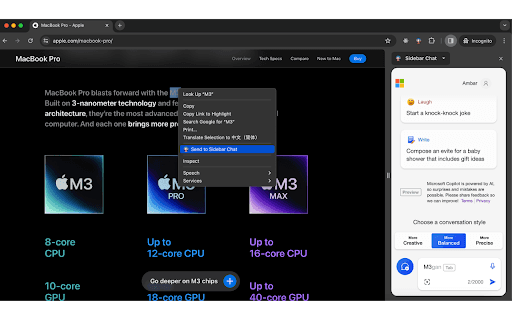
This browser sidebar offers a seamless and always-available AI assistance feature, enabling users to access helpful insights without interrupting their browsing experience. Whether answering questions, offering suggestions, or facilitating discussions, it acts as a reliable digital companion during your online activities.
How to Use
Press Command+B (or Ctrl+B on Windows) to open the sidebar or select 'Send to Sidebar Chat' from the context menu for quick access.
Features
- Integrated AI assistance within your browser
Use Cases
- Get instant AI help without leaving your webpage
Best For
DevelopersResearchersStudentsWritersAnyone needing quick browsing assistance
Pros
- Easy access to AI support
- Maintains your browsing flow
- Always available within the browser
Cons
- Requires specific hotkeys or menu options to activate
- Dependent on the AI capabilities integrated
FAQs
How can I open the Sidebar Chat?
Press Command+B (or Ctrl+B on Windows) or select 'Send to Sidebar Chat' from the right-click menu.
What assistance does the Sidebar Chat offer?
It provides AI-driven support, including quick answers, helpful suggestions, and detailed discussions.
Is the sidebar compatible with all browsers?
The sidebar extension is compatible with major browsers supporting extensions, ensuring broad usability.
Can I customize the hotkeys for opening the sidebar?
Hotkey customization depends on your browser's extension settings; check your browser's extension options.
Does the sidebar work offline?
The sidebar relies on AI services that require an internet connection to function properly.