
Skin Cancer Image Search
A Chrome extension designed to compare mole images against comprehensive skin cancer image databases for early detection.
About Skin Cancer Image Search
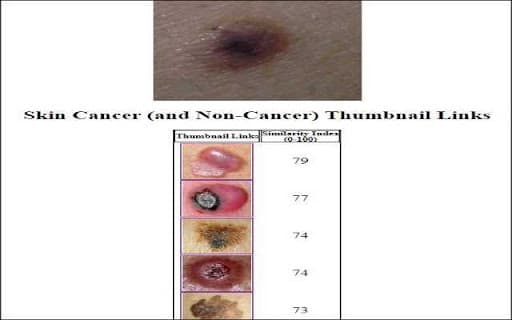
This Chrome extension assists users in assessing skin cancer risk by comparing uploaded mole images to a large database of skin lesion images. It analyzes the similarity between your mole and hundreds of images from multiple skin cancer sources, providing direct links to similar lesions for further review.
How to Use
Install the extension, upload a photo of your mole, and enter the current month's activation code. The tool then analyzes the image and offers links to similar skin lesion images for comparison.
Features
- Access to a database with images from 16 skin cancer sources
- Accurate analysis and comparison of mole images
- Provides links to visually similar skin lesion images
Use Cases
- Assessing potential skin cancer risk based on mole appearance
- Quick preliminary screening of skin lesions
- Monitoring moles for changes over time
- Supporting early detection of skin abnormalities
Best For
Individuals seeking quick mole assessmentsPeople worried about skin cancer risksPatients monitoring suspicious molesAnyone interested in skin health screening
Pros
- Enables rapid visual comparison of moles
- User-friendly Chrome extension
- Helps with early skin cancer detection
- Access to an extensive skin lesion image database
Cons
- Accuracy varies with image quality and database size
- Limited to hundreds of images, not exhaustive
- Not a replacement for medical diagnosis
- Requires monthly activation codes for use
FAQs
How do I activate the Chrome extension?
After installation, enter the current month's activation code found in the extension's instructions. This enables full functionality.
What if I have trouble with activation codes?
Contact support at service@opticomdataresearch.com for assistance with activation codes and setup.
Can this extension replace professional medical advice?
No, it is not a substitute for professional consultation. Always consult a dermatologist for accurate diagnosis and treatment.
What types of images can I upload?
You can upload clear photos of your moles to get accurate comparison results.
Is the extension safe to use?
Yes, it is designed to be secure and respects user privacy when uploading images.