

Skribr - Rewrite badly written task descriptions with one click
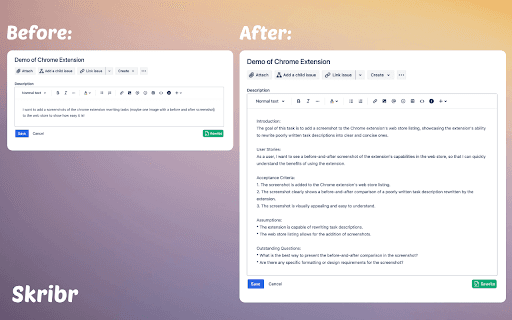
Skribr simplifies poorly written task descriptions with a single click, enhancing clarity instantly.
About Skribr - Rewrite badly written task descriptions with one click
Skribr is an intelligent tool that instantly rewrites unclear task descriptions, making instructions clearer and more effective. This streamlines communication, saves time, and minimizes misunderstandings within teams.
How to Use
Enter your poorly written task description into Skribr, then click the rewrite button. The tool will generate a clearer, more concise version instantly.
Features
- One-click rewriting of task descriptions
- Speeds up task clarification process
- Enhances clarity and brevity of instructions
Use Cases
- Clarifying project tasks for better team understanding
- Refining user stories in software development
- Simplifying instructions for customer support teams
Best For
Project managersContent creatorsSoftware developersCustomer service teamsTeam leaders
Pros
- User-friendly with a simple one-click interface
- Automates rewriting to save time
- Reduces miscommunication through clearer instructions
Cons
- AI quality affects rewriting accuracy
- May need adjustments for technical or specialized tasks
- Vague original descriptions may lead to misinterpretation
FAQs
How does Skribr improve task descriptions?
Skribr uses AI to analyze and produce clearer, more concise task instructions.
Can Skribr handle technical task descriptions?
Yes, but highly technical or specialized descriptions might require further editing for precision.
Is Skribr suitable for team collaboration?
Absolutely, it helps teams communicate instructions more effectively and efficiently.
Does Skribr save time on task management?
Yes, by automating the rewriting process, it speeds up task clarification and reduces delays.
Is there a free trial available for Skribr?
Please check the official website for current trial options and pricing plans.