
Smart Text
An AI-powered Chrome extension that facilitates seamless text rephrasing and instant query answers directly on web pages.
About Smart Text
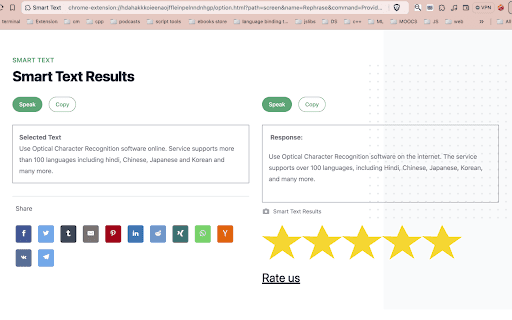
Smart Text is an intelligent Chrome extension designed to enhance your online experience. With AI-driven capabilities, it allows users to quickly rephrase text or receive detailed answers from web content with just a right-click. Improve your productivity and streamline your workflow efficiently.
How to Use
Install the Smart Text Chrome extension. Right-click on any selected text on a web page to access options for rephrasing or obtaining informative answers instantly from the context menu.
Features
- Provides accurate, informative answers
- Enables precise text rephrasing
- User-friendly, intuitive interface
Use Cases
- Effortlessly rephrase content for diverse audiences
- Quickly find answers to questions directly from web pages
Best For
ResearchersContent writersStudentsEditorsOnline content creatorsAcademics
Pros
- Boosts productivity with fast access to rephrasing and information retrieval
- Simple to use through an integrated Chrome context menu
- Enhances workflow by reducing the need to switch apps
Cons
- Limited to use within the Chrome browser
- Effectiveness relies on AI model quality
- Requires internet connection for optimal performance
FAQs
How do I access Smart Text's features?
After installing the extension, right-click on any web page text. The context menu will display options for rephrasing or answering questions.
What functions does Smart Text offer?
It enables quick rephrasing of selected text and provides informative answers based on web page content.
Is an internet connection necessary?
Yes, a stable internet connection is required for the AI features to work effectively.
Can I use Smart Text on mobile browsers?
No, currently, it is only available as a Chrome extension for desktop browsers.
Does Smart Text support multiple languages?
Yes, it can rephrase and answer questions in several languages, depending on the AI model capabilities.