

Social AI Assistant
An AI-powered Chrome extension designed to generate intelligent social media responses on Twitter and LinkedIn, enhancing user engagement and interaction.
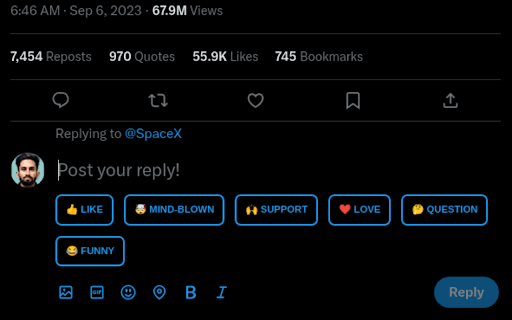
About Social AI Assistant
Social AI Assistant is a Chrome extension that boosts your social media presence by providing AI-generated replies on Twitter and LinkedIn. It helps users craft engaging, context-aware responses quickly, reducing writer's block and saving time. Customizable and intelligent, it elevates your social interactions effortlessly.
How to Use
Install the Social AI Assistant Chrome extension. When browsing Twitter or LinkedIn, click the extension icon to generate suggested responses. Customize these replies before posting to ensure they reflect your voice.
Features
- Provides context-aware reply suggestions
- Accelerates social media engagement
- Offers customizable response options
- Supports Twitter and LinkedIn responses
Use Cases
- Enhancing social media engagement for brands
- Replying efficiently to tweets on Twitter
- Creating professional comments on LinkedIn posts
- Overcoming writer's block on social platforms
Best For
Social media marketersContent creatorsBusiness professionalsCommunity managersInfluencers
Pros
- Simple installation and user-friendly interface
- Improves the quality of social media interactions
- Free to use with no cost
- Speeds up response generation
- Assists in overcoming response writer's block
Cons
- Limited to Twitter and LinkedIn currently
- May need personalization for a natural tone
- AI responses might require editing for originality
FAQs
Which platforms does Social AI Assistant support?
It supports Twitter and LinkedIn for social media responses.
Is Social AI Assistant free?
Yes, it is available at no cost for users.
Can the AI understand the context of posts?
Yes, it analyzes the content to generate contextually relevant replies.
Is the extension easy to install?
Yes, installing the extension is quick and straightforward.
Can I customize the suggested responses?
Absolutely, users can edit responses before posting to match their voice.