

Speak based on Azure Speech
A powerful text-to-speech extension leveraging Azure Speech, supporting numerous languages and Chrome's Live Caption feature for enhanced accessibility.
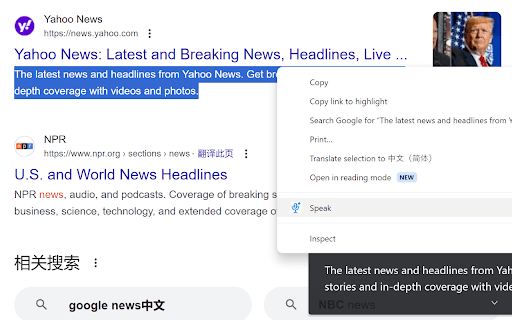
About Speak based on Azure Speech
This text-to-speech (TTS) extension uses Azure Speech Service to convert selected text into natural-sounding audio. It offers support for many languages and seamlessly integrates with Chrome's Live Caption feature to improve accessibility. Users must configure the extension with their Azure Speech API key to activate TTS functionality.
How to Use
Install the extension, input your Azure Speech API key in the settings, select text on any webpage, and click to play the audio. Customize voice and language preferences for optimal results.
Features
- Customizable voice and language settings
- Converts text to speech using Azure Speech Service
- Works with Chrome's Live Caption for real-time transcription
- Supports a broad spectrum of languages
Use Cases
- Create audio versions of written content
- Enhance accessibility for visually impaired users
- Listen to articles, documents, and web pages
- Improve pronunciation skills in various languages
Best For
Language learnersStudents and researchersContent creatorsIndividuals with visual impairmentsAccessibility advocates
Pros
- Supports a wide array of languages
- Integrates with Chrome Live Caption for real-time transcription
- Free tier offers up to 0.5 million characters monthly
- Powered by high-quality Azure Speech Service
Cons
- Charges apply beyond the free tier usage limit
- Performance depends on Azure Speech Service availability
- Requires an Azure account and API key
FAQs
Is an Azure account necessary to use this extension?
Yes, you need an Azure account and a Speech Service API key. The free tier covers basic usage needs.
Which languages are supported by this extension?
It supports numerous languages including English, Chinese, Arabic, Bulgarian, Catalan, Czech, Danish, German, Greek, Spanish, Finnish, French, Hebrew, Hindi, Croatian, Hungarian, Indonesian, Italian, Japanese, Korean, Malay, Norwegian, Dutch, Polish, Portuguese, Romanian, Russian, Slovak, Slovenian, Swedish, Tamil, Telugu, Thai, Turkish, and Vietnamese.
Is this extension free to use?
The extension is free, but Azure charges apply if you exceed the 0.5 million characters monthly free usage.
Can I use this extension with Chrome's Live Caption?
Yes, it integrates with Chrome Live Caption to provide real-time transcriptions of the generated speech.
How do I configure the extension?
Install the extension, enter your Azure Speech API key in the settings, then select text to convert it into speech.
Does it support multiple voices and accents?
Yes, users can choose from various voices and accents available through Azure Speech Service.