

storageGPT
A powerful tool that enables you to save and organize ChatGPT conversations locally in Markdown format for easy access and management.
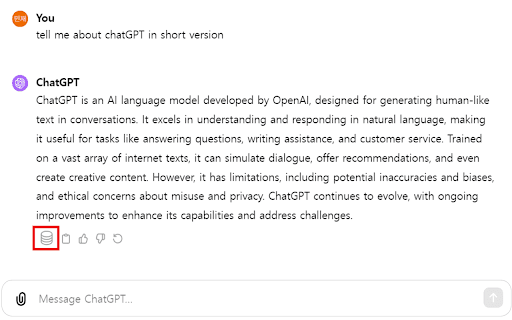
About storageGPT
storageGPT enhances your ChatGPT experience by allowing seamless saving and downloading of conversations in Markdown format. It provides a secure way to store chat transcripts locally, ensuring your data remains private without transmitting information to external servers.
How to Use
To save a ChatGPT conversation, click the 'Save' button beneath the chat responses. You can also quickly access saved chats using the keyboard shortcut 'Control + Shift + X' to open the storage drawer.
Features
- Secure local storage for chat transcripts
- Quick access via keyboard shortcut
- Save ChatGPT conversations effortlessly
- Export conversations in Markdown for easy editing and sharing
Use Cases
- Preserving important ChatGPT discussions for future reference
- Archiving conversations for documentation purposes
- Sharing AI chat transcripts in a clear, readable format
- Building a personal knowledge base from chat histories
- Organizing research or project notes from ChatGPT interactions
Best For
DevelopersContent creatorsResearchersStudentsWritersChatGPT users
Pros
- Ensures data privacy with local storage
- Supports Markdown format for easy editing and sharing
- Fast access with customizable keyboard shortcuts
- Simple interface with a straightforward save button
Cons
- Requires installation as a browser extension
- Limited to saving and downloading conversations
FAQs
How can I save my ChatGPT conversations with storageGPT?
Click the 'Save' button below the chat responses or press 'Control + Shift + X' to open the storage drawer and manage your saved chats.
Is my data protected when using storageGPT?
Yes, all conversations are stored locally on your device, ensuring complete privacy and data security.
In what format are conversations saved?
Conversations are saved in Markdown format, making them easy to read, edit, and share.
Can I access saved conversations offline?
Absolutely. All saved chats are stored locally, so you can access them anytime without an internet connection.
Is storageGPT compatible with all browsers?
It is designed as a browser extension compatible with popular browsers like Chrome and Firefox.