

Summary with Bing Chat for YouTube
Efficiently summarizes YouTube videos using Bing Chat, enabling quick content comprehension.
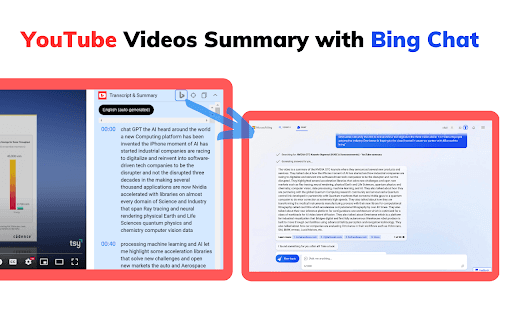
About Summary with Bing Chat for YouTube
YouTube Summary with Bing Chat for all browsers offers instant video summaries, allowing users to grasp content quickly. This tool leverages Bing Chat's AI capabilities to generate concise summaries, saving time and enhancing learning efficiency.
How to Use
Navigate to YouTube, select a video, open the 'Transcript & Summary' menu, then click 'AI Summary'. A new tab will open with the summary generated via Bing Chat (requires a Microsoft account with Bing Chat access).
Features
- Instant access to YouTube video summaries
- One-click summary generation for convenience
- Option to copy full video transcripts
- Navigate to specific timestamps within transcripts
- Rapid loading of summarized content
Use Cases
- Extract transcripts for research and note-taking
- Quickly grasp video content without watching entire videos
- Enhance learning efficiency with concise summaries
- Save time by reading summaries instead of watching lengthy videos
Best For
ProfessionalsStudentsContent creatorsResearchersLifelong learners
Pros
- Enables jumping to key moments in videos
- Compatible with all web browsers
- Saves time with quick summaries
- Provides access to full transcripts
- Simple, one-click summary creation
Cons
- Some users may lack access to Bing Chat features
- Requires a Microsoft account with Bing Chat permissions
- Dependent on the availability of video transcripts
FAQs
What is Bing Chat used for?
Bing Chat is an AI-powered chat platform based on GPT-4, offering accurate answers and content summaries to enhance your browsing experience.
How does the YouTube video summary feature work?
It generates a concise overview of a video's content using Bing Chat's AI, helping you understand videos quickly without watching the entire clip.
Do I need a Microsoft account to use this tool?
Yes, accessing Bing Chat features requires signing in with a Microsoft account that has Bing Chat enabled.
Is this tool compatible with all web browsers?
Yes, it works seamlessly across all major browsers, including Chrome, Firefox, Edge, and Safari.
Can I copy the full transcript of a YouTube video?
Yes, the tool allows you to copy the complete transcript for reference or note-taking purposes.