

Summary with ChatGPT for Google and YouTube
A browser extension that summarizes Google search results and YouTube videos using ChatGPT for quick understanding and efficiency.
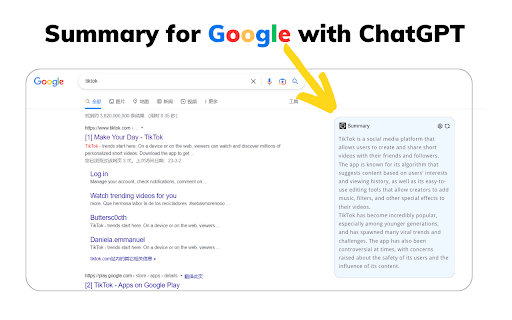
About Summary with ChatGPT for Google and YouTube
This browser extension leverages ChatGPT to deliver concise summaries of Google search results and YouTube videos. It helps users quickly grasp key points without reading full articles or watching entire videos, enhancing productivity and saving time.
How to Use
After installing, set up your API key via the options menu. For stability, use your OpenAI API key from platform.openai.com rather than the ChatGPT Webapp. Paste the API key into the extension settings and save. Summaries will then be displayed alongside search results and videos for immediate access.
Features
- Provides concise summaries of YouTube videos
- Summarizes Google search results for quick insights
Use Cases
- Quickly grasp the main ideas in Google search results
- Get summaries of YouTube videos without watching full content
Best For
ResearchersContent consumers seeking quick insightsStudentsProfessionals
Pros
- Saves time by condensing lengthy content
- Delivers instant summaries of search results and videos
- Offers a free option with ChatGPT Webapp
- Simple installation and user-friendly interface
Cons
- Requires an OpenAI API key for optimal stability
- Potential future introduction of a paywall
- ChatGPT Webapp option may be unstable and needs Cloudflare login
FAQs
What is ChatGPT?
ChatGPT is an AI language model developed by OpenAI that generates human-like text responses based on user prompts, covering topics like general knowledge, conversations, and creative writing.
What does Google/YouTube Summary with ChatGPT do?
It provides real-time summaries of Google search results and YouTube videos, helping users understand content quickly and efficiently.
Is this extension free to use?
Yes, the extension is currently free. Future plans may include a small fee to support ongoing development and offer premium features.
Do I need an OpenAI account to use the extension?
Yes, you need a free OpenAI account to generate an API key, which is required for full functionality. You can create an account at chat.openai.com.
How do I set up the API key?
Navigate to the extension's options page, input your OpenAI API key, and save. For best stability, avoid using the ChatGPT Webapp login and instead use your own API key.