

Superchat - ChatGPT website chat
AI-powered browser assistant that extracts key information from web content using ChatGPT technology.
About Superchat - ChatGPT website chat
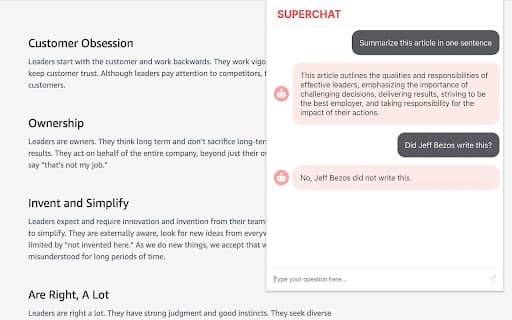
Superchat, an AI-driven browser assistant utilizing ChatGPT, helps you efficiently extract insights from web content. Whether you're analyzing lengthy documents or web pages, easily activate Superchat to summarize, clarify, and gather important information. Streamline your workflow and boost productivity with this simple, powerful tool designed for busy professionals and students alike.
How to Use
While browsing a lengthy webpage or document, activate Superchat with the keyboard shortcut COMMAND (or CTRL) + SHIFT + S. Then, ask questions about the content directly within your browser window.
Features
- Instantly extract relevant information from web pages with ChatGPT.
Use Cases
- Simplifying complex topics
- Summarizing lengthy articles
- Quickly answering questions about web content
Best For
Business professionalsFrequent online readersResearchersStudentsContent creators
Pros
- Easy access via keyboard shortcut
- User-friendly and straightforward interface
- Powered by ChatGPT for accurate responses
- Efficiently extract information from web pages
Cons
- Requires access to active browser content
- Limited details on offline functionality
- Accuracy depends on ChatGPT’s capabilities
FAQs
How do I activate Superchat?
Press COMMAND (or CTRL) + SHIFT + S to trigger Superchat during browsing.
What types of questions can I ask Superchat?
You can request summaries, explanations, or specific details about the webpage content.
Is Superchat compatible with all browsers?
Superchat works with most modern browsers that support extensions, such as Chrome and Firefox.
Does Superchat work offline?
Superchat requires an active internet connection to communicate with ChatGPT.
Is there a cost to use Superchat?
Pricing details are available upon installation; some features may require a subscription or purchase.