
TabJam for ChatGPT
A powerful ChatGPT add-on that seamlessly integrates web page content into your conversations for enhanced productivity.
About TabJam for ChatGPT
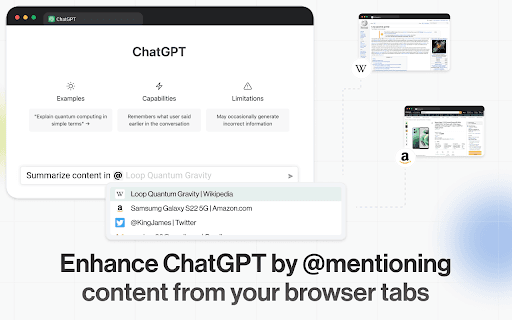
TabJam is a free third-party ChatGPT extension that enhances your experience by allowing easy incorporation of web page content into chats. Quickly pull information from open browser tabs using @mentions or keyboard shortcuts, streamlining your workflow and making information retrieval effortless.
How to Use
Use TabJam by @mentioning open browser tabs within ChatGPT or pressing [Cmd ⌘]+J (Mac) or [Ctrl]+M (Windows) while viewing a webpage to start a new chat with its content.
Features
- Start a new ChatGPT conversation with web page content via keyboard shortcut
- Mention open browser tabs with @ to include their content in chats
- Easily embed content from multiple tabs into ChatGPT discussions
Use Cases
- Responding to tweets effectively
- Researching top restaurants using TripAdvisor threads
- Creating engaging social media one-liners
- Summarizing Wikipedia articles quickly
- Extracting data from conference websites
- Rewriting marketing content for campaigns
- Brainstorming solutions in Google Docs
- Drafting personalized emails from LinkedIn profiles
- Comparing product specifications efficiently
Best For
MarketersResearchersContent CreatorsWritersBusiness ProfessionalsStudentsSocial Media Managers
Pros
- User-friendly with @mention and keyboard shortcut features
- Integrates web content seamlessly into ChatGPT
- No cost to use
- Boosts ChatGPT with real-time web data access
Cons
- Requires installing a third-party extension
- Dependent on open browser tabs for content access
- Not officially supported by OpenAI
FAQs
Is TabJam free to use?
Yes, TabJam is a free third-party extension for ChatGPT users.
Is TabJam developed by OpenAI?
No, it was created by an independent team and is not officially endorsed by OpenAI.
How can I start a chat with web page content?
While on a webpage, press [Cmd ⌘]+J on Mac or [Ctrl]+M on Windows to initiate a chat with its content.
How do I include open tab content in ChatGPT?
Type @ in ChatGPT, select the desired open tab from the list, and include its content in your message.
Does TabJam work with all browsers?
It works with most Chromium-based browsers that support extensions, such as Chrome and Edge.
Is there a limit to how many tabs I can mention?
There is no strict limit, but it's recommended to mention only relevant tabs for clarity.