

Talk to GPT
A Chrome extension that enables voice-based interaction with ChatGPT, supporting multiple languages and error correction features.
About Talk to GPT
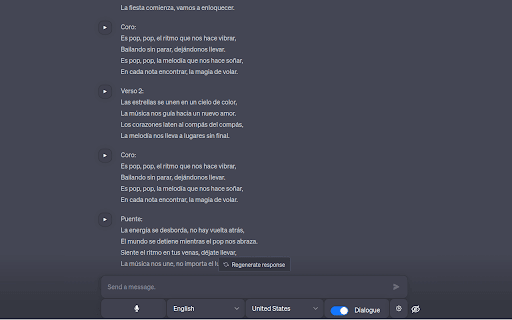
Talk to GPT is a powerful Chrome extension that allows users to communicate with ChatGPT on chat.openai.com using their voice. It converts spoken words into text via the browser's Speech Recognition API, supports numerous languages, and offers features like language level adjustment and error correction to enhance your experience.
How to Use
Install the Talk to GPT Chrome extension, visit chat.openai.com, and use your microphone to speak prompts. The extension transcribes your speech and sends it directly to ChatGPT for response.
Features
- Adjustable language proficiency levels
- ChatGPT-enabled error correction
- Support for multiple languages
- Hands-free voice input for ChatGPT
Use Cases
- Enhancing spoken language skills
- Efficiently input complex prompts
- Hands-free communication with ChatGPT
- Learning new languages with AI assistance
Best For
Individuals with accessibility needsProfessionals requiring hands-free ChatGPT accessLanguage learnersUsers preferring voice input over typing
Pros
- Supports language learning functionalities
- Easy-to-use voice input feature
- Multiple language support
- Enables hands-free interaction
Cons
- Dependent on the accuracy of browser's Speech Recognition API
- Limited to chat.openai.com platform
- May need configuration for optimal performance
FAQs
Which languages are supported by Talk to GPT?
Talk to GPT supports all languages compatible with the Chrome Speech Recognition API.
Can ChatGPT correct my language mistakes?
Yes, you can activate a feature that allows ChatGPT to correct your language errors.
Is the extension compatible with all browsers?
No, it is specifically designed for Google Chrome to utilize the Speech Recognition API.
How accurate is voice transcription?
Transcription accuracy depends on the browser's Speech Recognition API and ambient noise levels.
Do I need an API key to use this extension?
No, the extension works directly through chat.openai.com without requiring an API key.