

Talkingvet
Veterinary speech recognition extension designed for efficient note-taking and hands-free operation in veterinary practices.
About Talkingvet
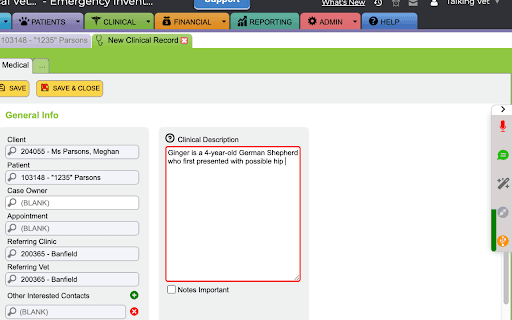
The Talkingvet® Chrome Extension leverages advanced veterinary speech recognition technology from nVoq to streamline note creation. It supports multiple microphone types, including smartphones and professional microphones, enabling voice commands for text input, template insertion, and basic browser controls. Compatible with Windows, macOS, Linux, and Chromebooks, it enhances hands-free documentation in veterinary workflows.
How to Use
Install the Talkingvet® Chrome Extension, log in with your account, adjust settings as needed, and reload your browser. Use your microphone to dictate notes and activate voice commands for inserting text, opening templates, and controlling browser functions.
Features
- Voice commands for text entry and browser control
- Compatibility with various microphones and devices
- Veterinary-specific speech recognition technology
- Support for customizable templates
- Works across multiple operating systems
Use Cases
- Performing hands-free operations during veterinary examinations
- Entering patient data into veterinary software via voice
- Rapidly dictating veterinary notes and observations
Best For
Pros
- Includes Talkingvet Mobile Microphone with subscription
- Enables hands-free operation through voice commands
- Supports a wide range of microphones and operating systems
- Integrates with customizable templates for efficiency
- Accelerates note-taking with accurate speech recognition
Cons
- Requires initial setup and configuration
- Dependent on an active Talkingvet® account
- Requires Chrome version 103 or later for optimal performance