

TemplateIn - Templates for the web
A Chrome extension designed for seamless template creation, access, and management across the web.
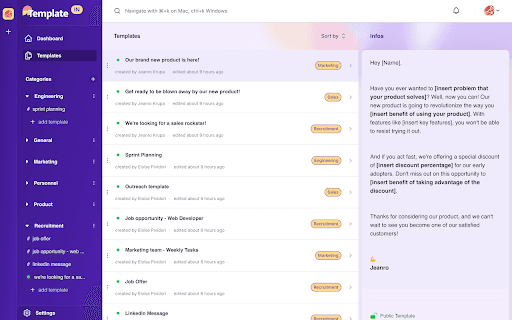
About TemplateIn - Templates for the web
TemplateIn is a powerful Chrome extension that simplifies workflow management by enabling users to create, access, and organize templates from any web page. It boosts efficiency for professionals through centralized template storage, AI-driven text enhancements, usage analytics, and collaboration features such as commenting.
How to Use
Install the TemplateIn Chrome extension and register on template-in.com. Select a personal or team plan to suit your needs. Instantly access your templates via a click or shortcut on any webpage.
Features
- Real-time usage tracking
- Access templates from any web page
- Collaborative commenting features
- Easy template creation and organization
- AI-powered text enhancement
Use Cases
- Recruiters reaching out to candidates
- Sales teams prospecting leads
- Product managers drafting feature descriptions
Best For
RecruitersSales professionalsCustomer support teamsMarketing teamsProduct managersContent creators
Pros
- AI-driven text optimization for clearer messaging
- Usage analytics for template performance
- Enhanced productivity with quick template access
- Team collaboration and commenting
- Centralized template management
Cons
- Requires a TemplateIn account
- Limited to Chrome browser
- Pricing plans may limit some users
FAQs
What is TemplateIn?
TemplateIn is a Chrome extension that enables creating, accessing, and managing templates from any web page, streamlining your workflow.
Is an account necessary to use TemplateIn?
Yes, you need an account on template-in.com to access all features. Choose a personal or team plan based on your needs.
Does TemplateIn support AI features?
Yes, it offers AI-powered text optimization to improve the clarity and effectiveness of your templates.
Can I collaborate with others using TemplateIn?
Absolutely. The extension includes commenting features that facilitate team collaboration on templates.
Which browsers are compatible with TemplateIn?
Currently, TemplateIn is available exclusively for the Chrome browser.
How does TemplateIn improve productivity?
It provides quick access to templates, AI enhancements, and collaboration tools, saving time and streamlining communication.