

Text AIder
An AI-powered Chrome extension that provides real-time text correction and writing support, enhancing your online communication.
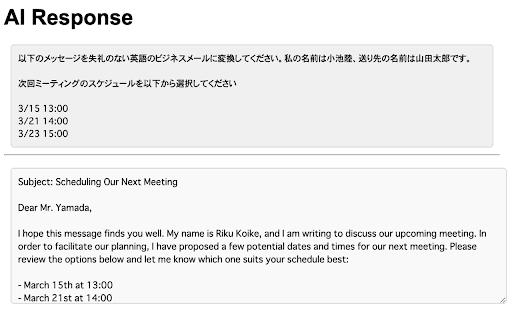
About Text AIder
This Chrome extension enhances your writing by offering AI-driven text correction and editing features. Users can select text on any webpage, right-click to access a menu, and receive instant suggestions to improve grammar, style, and clarity. It simplifies online editing for emails, social media, and documents, making your writing more professional and polished.
How to Use
Highlight the desired text on any webpage, right-click to open the context menu, and select the extension’s option to analyze and receive editing suggestions.
Features
- AI-driven correction for grammar, style, and syntax
- Instant suggestions with real-time analysis
- Easy access via context menu integration
Use Cases
- Enhancing email and social media content
- Editing online documents efficiently
- Improving professional correspondence
- Assisting students with writing tasks
- Supporting content creators in polishing their work
Best For
WritersBusiness professionalsSocial media managersStudentsContent creatorsEmail marketers
Pros
- User-friendly with seamless context menu access
- Speeds up the editing process
- Compatible with any webpage
- Enhances writing quality through AI suggestions
Cons
- Requires Google Chrome browser
- Dependent on AI model accuracy
- Less effective for highly technical or specialized writing without customization
FAQs
How does this extension improve my writing?
It uses AI to analyze your text and provide real-time suggestions for grammar, style, and syntax improvements, resulting in clearer, more effective writing.
Can I use this extension on all websites?
Yes, it works on any webpage where you can select text, including email platforms, social media sites, and online document editors.
Is this extension suitable for professional writing?
Absolutely. It helps improve the clarity, grammar, and style of your professional communications and online content.
Does the extension support multiple languages?
Currently, it primarily supports English, but future updates may include additional language options.
Is there a cost for using this extension?
The extension offers both free and premium features. Specific pricing details are available on the official website.