

Text Assistant
A Chrome extension that enhances writing, proofreading, and text explanation using the OpenAI API for seamless productivity.
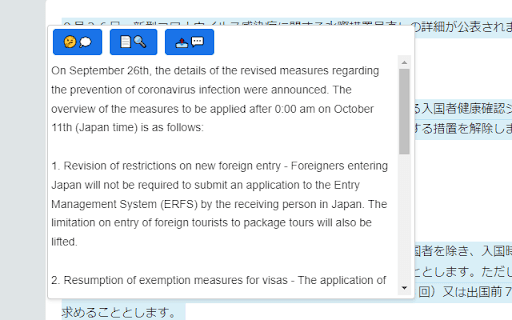
About Text Assistant
Text Assistant is a powerful Chrome extension that integrates with the OpenAI API to deliver instant solutions for writing, editing, and understanding text. Users can easily explain complex passages, proofread documents, and generate responses directly within their browser, streamlining their workflow.
How to Use
Install the Text Assistant Chrome extension, then enter your OpenAI API key in the settings. Highlight any text in your browser to access features such as explanation, proofreading, or reply generation with a single click.
Features
- Instant text explanations
- Automated reply generation
- Accurate proofreading and editing
Use Cases
- Fix grammar and spelling mistakes quickly
- Create professional responses for emails and messages
- Understand complex or technical text passages
Best For
EditorsContent writersStudentsProfessionals handling frequent communicationAnyone working with extensive text
Pros
- Simple, one-click interface for quick results
- Seamless integration with Chrome browser
- Powered by advanced OpenAI language models
- Offers versatile tools for text editing and explanation
Cons
- Lacks user ratings for satisfaction assessment
- Requires an OpenAI API key setup
- Dependent on OpenAI API availability and performance
FAQs
What is Text Assistant?
Text Assistant is a Chrome extension that uses OpenAI's API to help you write, proofread, and understand text efficiently.
Is an OpenAI API key required to use this extension?
Yes, you need to provide an OpenAI API key in the extension settings to enable its features.
Can I use Text Assistant for professional writing tasks?
Absolutely. It helps with proofreading, generating responses, and clarifying complex content for professional use.
How do I install and activate Text Assistant?
Download the extension from the Chrome Web Store, install it, and enter your OpenAI API key in the settings to start using it.
What types of text can I analyze with this extension?
You can explain, proofread, and generate replies for various types of text, including emails, articles, and technical documents.