

Track Change GPT
Track Change GPT is a powerful add-on for ChatGPT that enables efficient text editing and precise change tracking, streamlining your content review process.
About Track Change GPT
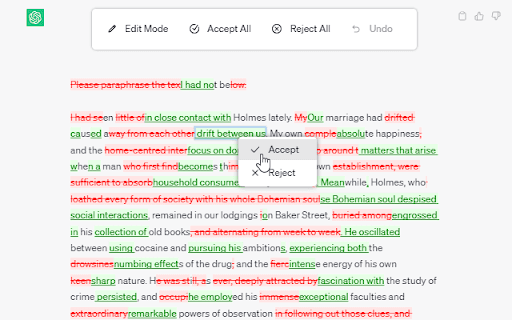
Track Change GPT enhances ChatGPT with seamless change tracking and editing features. It simplifies content refinement by allowing users to view, accept, or reject modifications, especially those generated by AI, with an intuitive interface.
How to Use
Activate the change tracking feature using the dedicated Track Change button. Edit text in 'Edit Mode,' then review AI-suggested modifications. Accept or reject changes through pop-up prompts, or use the menu options for bulk actions like 'Accept All,' 'Reject All,' or 'Undo.'
Features
- Accept or reject individual changes via pop-up dialogs
- Undo recent modifications easily
- Switch to 'Edit Mode' for direct text editing
- Visual change tracking with color highlights
- Bulk accept or reject all changes instantly
Use Cases
- Refining AI-generated content while tracking edits
- Collaborative document review
- Editing research papers or reports
- Content proofreading and revision
- Educational writing and editing
Best For
WritersContent creatorsStudentsResearchersEditors
Pros
- Supports multiple languages for global use
- Comprehensive editing and review options
- User-friendly, intuitive interface
- Efficient tracking of AI-generated changes
Cons
- Limited to ChatGPT integrations
- Requires ChatGPT API and updates
FAQs
How can I enable change tracking in Track Change GPT?
Activate change tracking by toggling the Track Change button within the add-on interface.
How do I accept or reject AI-suggested edits?
Click on the modified text to open a pop-up window, then choose to accept or reject the change.
What editing features are available?
Use the menu options for 'Edit Mode' to modify text, 'Accept All' to approve all changes, 'Reject All' to discard all edits, and 'Undo' to revert recent changes.
Is Track Change GPT compatible with multiple languages?
Yes, it supports several languages, making it ideal for diverse editing needs.
Can I undo changes after editing?
Yes, the undo feature allows you to revert recent modifications easily.